

Learn how to install and configue the Observe by Snowflake CLI.
The Observe by Snowflake command line interface (CLI) is a typed, scriptable interface to Observe by Snowflake. You can search Datasets and metrics, run OPAL, inspect alerts, manage Datastreams, and install AI agent skills into coding agents.
See https://github.com/observeinc/cli for the full CLI reference.
Get started with the CLI
Run the following commands to install and get started with the CLI:
- Run the following command to install the CLI:
curl -fsSL https://raw.githubusercontent.com/observeinc/cli/main/install.sh | bash- Run the following command to sign in using the default browser OAuth method:
observe auth login- Specify the level of access you want to grant the CLI:
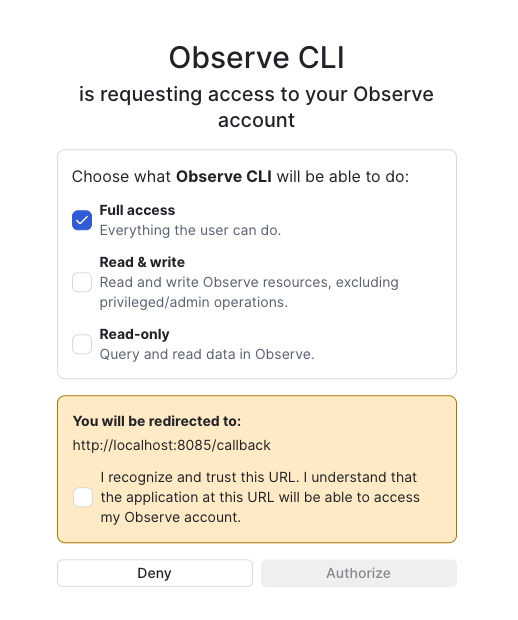
- Confirm the redirect URL, then click Authorize.
Use the following command for headless environments.
observe auth login --useDeviceCode --url <customerId>.observeinc.comFor scripts, store an API token instead of using OAuth:
observe auth configure --domain observeinc --customerId <id> --token <api-token>Tokens inherit your Observe by Snowflake user permissions and expire after a fixed lifetime (default 30 days). There is no refresh token; run observe auth login again when the token expires.
Install skills
Curated skills are in https://github.com/observeinc/skills. Install them with the following command:
observe skill install --all Skills your organization stores in Observe by Snowflake are listed with --user-defined.