

The Observe by Snowflake Terraform provider allows you to call the Observe by Snowflake REST API and create the same objects you can build in the UI, such as Datastreams, Datasets, Monitors, dashboards, Worksheets, pollers, and configure RBAC.
Perform the following steps to get started:
- Create an API authentication token. See Obtain a bearer token for local authentication.
- In the location where you will create your Terraform
.tffiles, create a file calledmain.tfand add the following code:
terraform {
  required_providers {
    observe = {
      source  = "observeinc/observe"
      version = "~> 0.14"
    }
  }
}
provider "observe" {}- Export the following environment variables, and be sure to replace the placeholders with real values from your environment:
export OBSERVE_CUSTOMER=<YOUR_CUSTOMER_ID>
export OBSERVE_DOMAIN=<YOUR_DOMAIN>
export OBSERVE_API_TOKEN=<OBSERVE_API_TOKEN>| Placeholder | Description |
|---|---|
<YOUR_CUSTOMER_ID> | Your customer or tenant ID. You can find this in the first part of your URL. For example, if you login using 123456789012.observeinc.com, your customer ID is 123456789012. |
<YOUR_DOMAIN> | Your domain value based on where your observe tenant is deployed. For example, if you login using 123456789012.observeinc.com, your domain value is observeinc.com. |
<OBSERVE_API_TOKEN> | Your Observe REST API token. |
- Run the following commands:
terraform init
terraform plan- Test to see if it works! In your
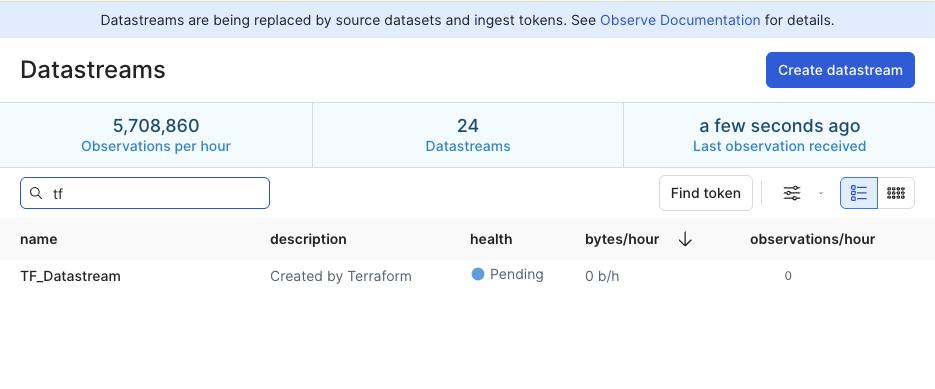
main.tf file, add the following code to create a sample Datastream called TF_Datastream:
resource "observe_datastream" "datastream" {
  name        = "TF_Datastream"
  description = "Created by Terraform"
  type        = "OtelLogs"
}- Run the following command, and type yes when prompted:
terraform applyIn the Observe by Snowflake UI, you can verify that the Datastream was created:
For detailed documentation on the provider please visit our provider page on the HashiCorp Terraform Registry.