

Install on Amazon ECS (EC2)
These steps guide you through installing the Observe Agent from Docker Hub with a configuration file, pushing that image to Amazon Elastic Container Registry (ECR), creating an Elastic Container Service (ECS) task definition that uses it, and finally running it as a service to collect container logs, metrics and traces from your ECS cluster.
Installation
Perform the following tasks:
- Verify prerequisites
- Install the Observe Agent
- Get a data ingestion token
- Prepare the Observe Agent configuration
- Create a CloudWatch log group for the Observe Agent
- Create the ECS task definition
- Create an ECS service
- Send application data to Observe by Snowflake
Verify prerequisites
Verify the following requirements are met:
- AWS CLI installed and configured
- Access to an ECS cluster running on EC2
- Permissions to create and manage Amazon ECR repositories and CloudWatch log groups
- Proper IAM roles for ECS tasks and execution (including permissions for CloudWatch Logs and ECR)
Install the Observe Agent
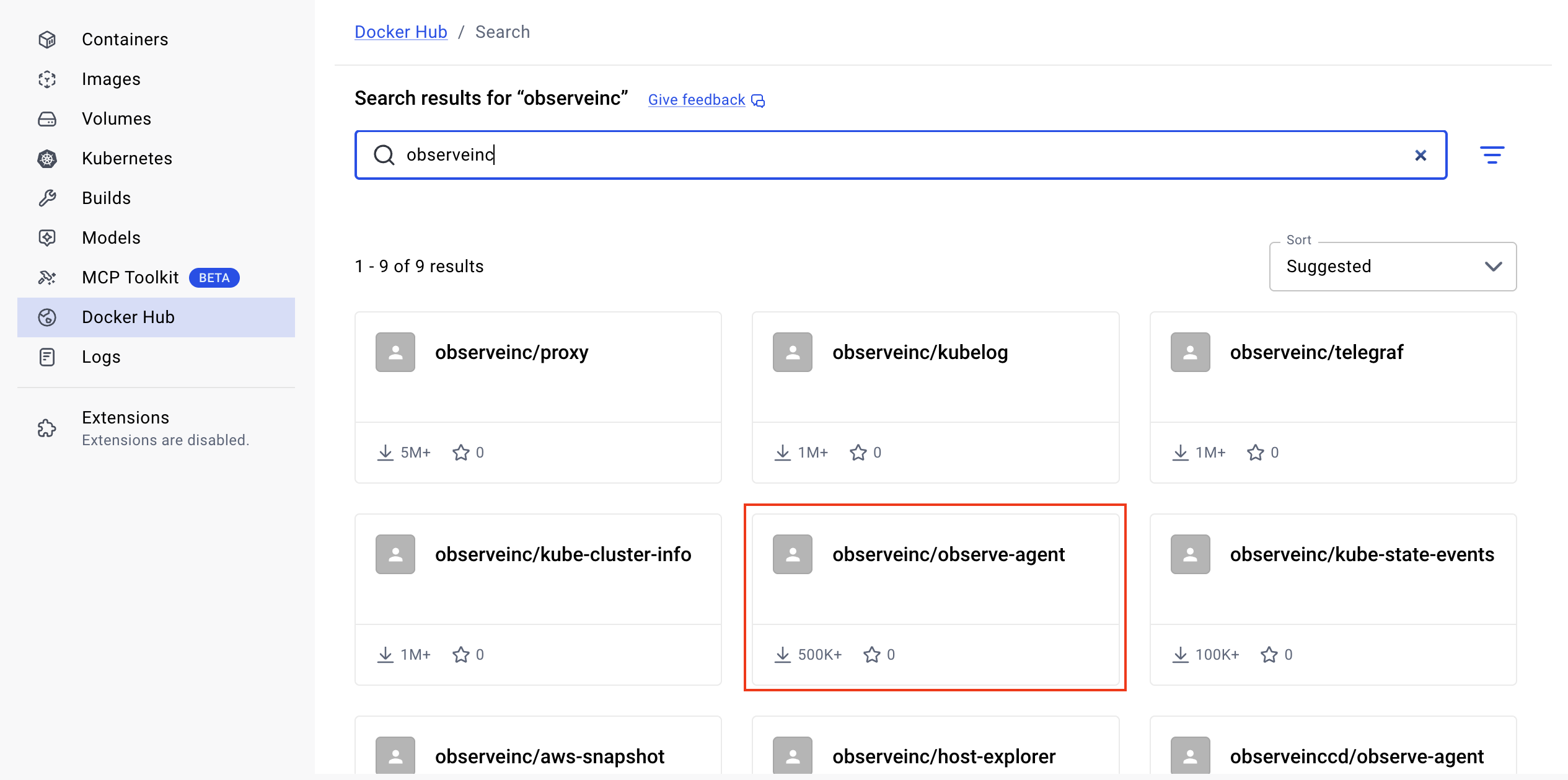
Install the Observe Agent from Docker Hub. Search for observeinc, select observeinc/observe-agent, then click Run.
Get a data ingestion token
Perform the following steps to get a data ingestion token:
- From the left navigation, select Data & integrations > Add Data.
- Click Linux.
- Click Create to generate a new ingest token. After the token is generated, make a note of it in a secure location. You will need to provide this token when you configure the
observe-agent.yamlfile in Prepare the Observe Agent configuration.
Prepare the Observe Agent configuration
Create the following observe-agent.yaml configuration file in S3 and mount it. See Mounting S3 file systems on Amazon ECS in the Amazon AWS documentation.
# Observe data token (ex: a1b2c3d4e5f6g7h8i9k0:l1m2n3o4p5q6r7s8t9u0v1w2x3y4z5a6)
token: "${TOKEN}"

# Target Observe collection url (ex: https://123456789012.collect.observeinc.com/)
observe_url: "${OBSERVE_URL}"

self_monitoring:
  enabled: true

host_monitoring:
  enabled: false
  logs:
    enabled: false
    include:
  metrics:
    host:
      enabled: false
    process:
      enabled: false

forwarding:
    enabled: true
    metrics:
        output_format: otel

otel_config_overrides:
  receivers:
    otlp:
      protocols:
        grpc:
          endpoint: 0.0.0.0:4317
        http:
          endpoint: 0.0.0.0:4318
    awsecscontainermetrics:
      collection_interval: 20s
    filelog/ecs:
      include: [/var/lib/docker/containers/**/*.log]
      include_file_path: true
      storage: file_storage
      retry_on_failure:
        enabled: true
      max_log_size: 4MiB
  service:
    pipelines:
      metrics/ecs:
        receivers: [awsecscontainermetrics]
        processors: [memory_limiter, resourcedetection, resourcedetection/cloud, batch]
        exporters: [otlphttp/observemetrics]
      logs/ecs:
        receivers: [filelog/ecs]
        processors: [memory_limiter, resourcedetection, resourcedetection/cloud, batch]
        exporters: [otlphttp/observe, count]
Alternatively, you can create secrets and pass configuration values to the Observe Agent via environment variables. See Pass Secrets Manager secrets through Amazon ECS environment variables in the Amazon AWS documentation.
Create a CloudWatch log group for the Observe Agent
Before running the task, ensure a CloudWatch log group exists for your agent logs:
aws logs create-log-group --log-group-name /aws/ecs/observe/observe-agent --region <your_region>Create the ECS task definition
Update the fields below with your values:
| Field | Description |
|---|---|
<your_account_id> | Your AWS account ID. |
<your_region> | Your AWS region, such as ca-central-1. See Observe delpoyment regions. |
<YOUR_INGEST_TOKEN> | Your instance's ingest token you create from the Add Data for Linux page, such as a1b2c3d4e5f6g7h8i9k0:l1m2n3o4p5q6r7s8t9u0v1w2x3y4z5a6. |
<YOUR_OBSERVE_COLLECTION_ENDPOINT> | Your Observe collection endpoint URL, such as https://123456789012.collect.observeinc.com/. |
<your_ecs_task_role> | An IAM role ARN granting necessary permissions to the task. |
<your_ecs_execution_role> | An IAM role ARN with permissions to read from ECR and write logs to CloudWatch. |
NoteSome Observe by Snowflake instances may optionally use a name instead of Customer ID; if this is the case for your instance, contact your Observe by Snowflake data engineer to discuss implementation. A stem name will work as is, but a DNS redirect name may require client configuration.
Make sure the execution role has logs:CreateLogStream and logs:PutLogEvents permissions.
{
    "family": "observe-agent-task",
    "containerDefinitions": [
        {
            "name": "observe-agent",
            "image": "<your_account_id>.dkr.ecr.<your_region>.amazonaws.com/observe/observe-agent:latest",
            "cpu": 100,
            "memory": 512,
            "portMappings": [
              {
                "containerPort": 4317,
                "protocol": "tcp"
              },
              { "containerPort": 4318,
                "protocol": "tcp"
              }
            ],
            "essential": true,
            "environment": [
                {
                    "name": "TOKEN",
                    "value": "<YOUR_INGEST_TOKEN>"
                },
                {
                    "name": "OBSERVE_URL",
                    "value": "<YOUR_OBSERVE_COLLECTION_ENDPOINT>"
                }
            ],
            "mountPoints": [
                {
                    "sourceVolume": "docker_logs",
                    "containerPath": "/var/lib/docker/containers",
                    "readOnly": true
                },
                {
                    "sourceVolume": "docker_sock",
                    "containerPath": "/var/run/docker.sock",
                    "readOnly": true
                }
            ],
            "volumesFrom": [],
            "readonlyRootFilesystem": false,
            "logConfiguration": {
                "logDriver": "awslogs",
                "options": {
                    "awslogs-group": "/aws/ecs/observe/observe-agent",
                    "awslogs-region": "<your_region>",
                    "awslogs-stream-prefix": "ecs"
                }
            },
            "systemControls": []
        }
    ],
    "taskRoleArn": "arn:aws:iam::<your_account_id>:role/<your_ecs_task_role>",
    "executionRoleArn": "arn:aws:iam::<your_account_id>:role/<your_ecs_execution_role>",
    "networkMode": "bridge",
    "volumes": [
        {
            "name": "docker_logs",
            "host": {
                "sourcePath": "/var/lib/docker/containers"
            }
        },
        {
            "name": "docker_sock",
            "host": {
                "sourcePath": "/var/run/docker.sock"
            }
        }
    ],
    "placementConstraints": [],
    "requiresCompatibilities": [
        "EC2"
    ]
}
Register this task definition using the AWS CLI:
aws ecs register-task-definition --cli-input-json file://observe-agent-task-definition.json --region <your_region>Create an ECS service
Run the following command in the AWS CLI to create an ECS service:
aws ecs create-service \
  --cluster <your_ecs_cluster_name> \
  --service-name observe-agent \
  --task-definition observe-agent-task \
  --deployment-controller type=ECS \
  --launch-type EC2 \
  --scheduling-strategy DAEMON \
  --region <your_region>
Send application data to Observe by Snowflake
Once the Observe Agent is deployed, configure your application instrumentation or set the OTEL_EXPORTER_OTLP_ENDPOINT environment variable to one of the following addresses to send application telemetry including traces to the Observe Agent.
NoteWhen setting up the endpoint to send traces, make sure you use the path that your OTLP library requires. Some libraries need traces to go to
/v1/traces, while others expect them at the root path/.
- OTLP/HTTP endpoint: http://localhost:4318
- OTLP/grpc endpoint: http://localhost:4317
See APM instrumentation for more information about how to instrument your app.
If your application is not able to reach the OTLP endpoints above, register the observe-agent ECS service in AWS Cloud Map.
Updated about 1 month ago
What’s Next
Use both the Log Explorer and the Metric Explorer to monitor your systems. To analyze your trace data, explore both the Trace Explorer and the Service Explorer.