

Install on Amazon ECS (Fargate - Sidecar Pattern)
This topic guides you through deploying the Observe Agent with a configuration file, updating your ECS task definition to use it, and finally running it as a service to collect metrics, traces, and logs from your ECS Tasks.
Prerequisites
Before you proceed, verify that the following requirements are met:
- You have AWS CLI installed and configured.
- You have an application running in ECS on Fargate
- You have access to an ECS Cluster.
- You have permissions to create and manage objects inside of an S3 bucket
- Your account has the proper IAM roles for ECS tasks and execution, including permissions for CloudWatch logs and S3.
Configuration architecture
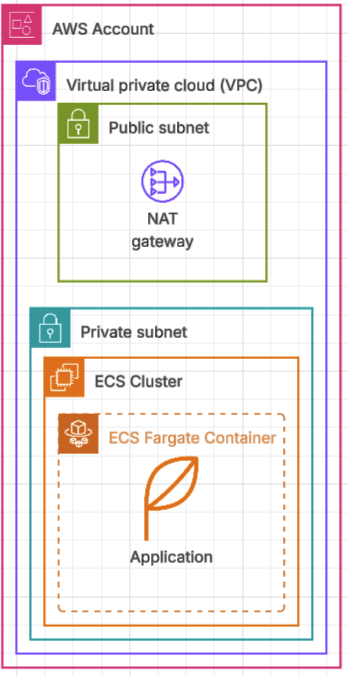
Given the following pre-configuration architecture, with an application running in ECS on an ECS cluster:
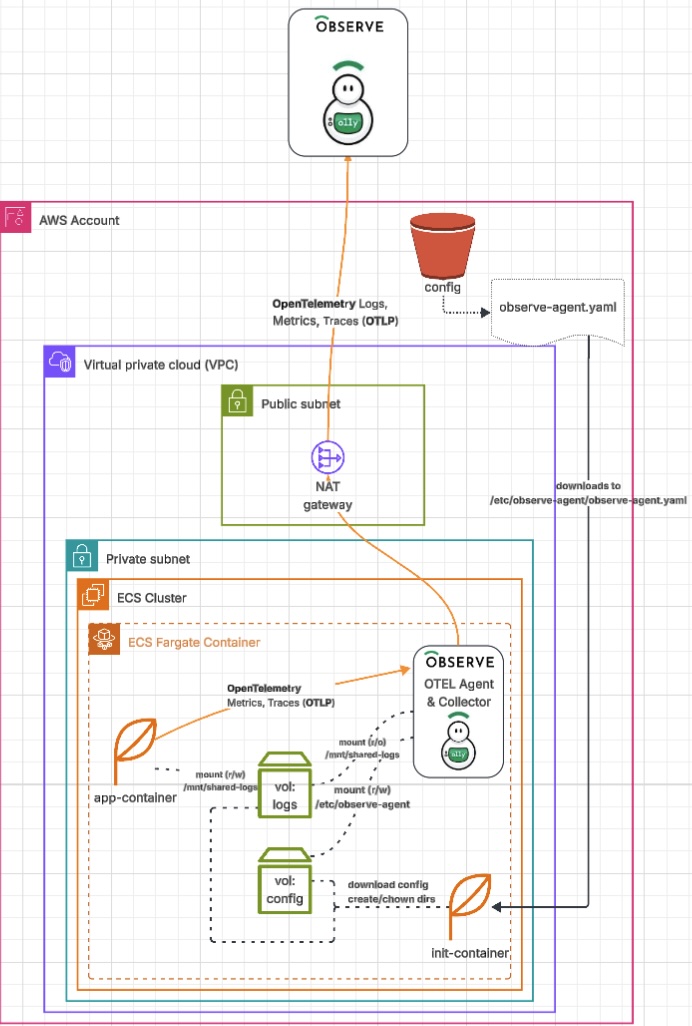
After you complete the steps on this page, the architecture looks like this:
Infrastructure setup
Perform the tasks in this section to create an S3 bucket and an IAM policy.
Create an S3 bucket
Run the following command in your AWS CLI to create an S3 bucket:
aws s3api create-bucket --bucket my-config-bucket --region us-west-2Create an IAM Policy
Create an IAM policy that grants access to the bucket you just created.
aws iam create-policy \
  --policy-name MyConfigAccessPolicy \
  --policy-document '{
    "Version": "2012-10-17",
    "Statement": [
      {
        "Action": [
          "s3:GetObject",
          "s3:ListBucket"
        ],
        "Effect": "Allow",
        "Resource": [
          "arn:aws:s3:::my-config-bucket",
          "arn:aws:s3:::my-config-bucket/*"
        ]
      }
    ]
  }'
The above command will output a policy ARN like the following:
arn:aws:iam::<ACCOUNT_ID>:policy/MyConfigAccessPolicyUse this policy ARN to replace <POLICY_ARN> in the following command:
aws iam attach-role-policy \
  --role-name my-ecs-task-role-name \
  --policy-arn <POLICY_ARN>
Below is an example command, with an actual policy ARN instead of a placeholder:
aws iam attach-role-policy \
  --role-name my-ecs-task-role-name \
  --policy-arn arn:aws:iam::123456789012:policy/MyConfigAccessPolicy
NoteYou must ensure that the
MyConfigAccessPolicyis attached to the IAM Role of your task IAM role andNOTyour task execution IAM role .
Configure the Observe Agent
Your next step is to create and upload your observe-agent.yaml file to the my-config-bucket S3 bucket so that your service can download and use it.
Configuration delivery and rendering options
There are several ways to handle the rendering of container configuration and secrets at runtime. This approach is simplistic and should not be used in production environments. It is merely used to demonstrate the pattern and should be altered based on the needs and requirements of your organization.
Below is a non-exhaustive list of other possible approaches:
- init container that downloads the file to a shared EBS volume and mounts it to
/etc/observe-agent/observe-agent.yaml. See Use Amazon EBS volumes with Amazon ECS in the Amazon documentation. - init container that renders a template from shell environment variables (populated by ECS and/or Secrets Manager)
- EFS volume mount containing the
/etc/observe-agent/observe-agent.yamlfile. See How do I mount an Amazon EFS file system on an Amazon ECS container or a task that runs on Fargate? in the Amazon documentation. - Shell Environment Variables - See the observe-agent configuration documentation
Create the observe-agent.yaml configuration file
observe-agent.yaml configuration file
NoteYou will want to replace
<ingest_token>,<tenant>,<service-name>,<service-version>, and<environmentwith your tenant- and application-specific values.
# Observe data token (ex: a1b2c3d4e5f6g7h8i9k0:l1m2n3o4p5q6r7s8t9u0v1w2x3y4z5a6)
token: "<ingest_token>"

# Target Observe collection url (ex: https://123456789101.collect.observeinc.com/)
observe_url: "https://<tenant>.collect.observeinc.com/"

host_monitoring:
  enabled: true
  logs:
    enabled: true
    include:
      - /mnt/shared/logs/*.json

forwarding:
  enabled: true
  metrics:
    output_format: otel
  endpoints:
    grpc: 0.0.0.0:4317
    http: 0.0.0.0:4318

resource_attributes:
  service.name: <service-name>               # e.g. "my-app"
  service.version: <service-version>         # e.g. "v.1.0"
  deployment.environment.name: <environment> # e.g. "dev"

otel_config_overrides:
  receivers:
    awsecscontainermetrics:
      collection_interval: 20s

    filelog/host_monitoring:
      operators:
        - type: json_parser
          timestamp:
            parse_from: attributes.asctime
            layout: "%Y-%m-%d %H:%M:%S,%f"

  service:
    pipelines:
      metrics/ecs:
        receivers:
          - awsecscontainermetrics
        processors:
          - batch
          - memory_limiter
          - resourcedetection
          - resourcedetection/cloud
        exporters:
          - otlphttp/observemetrics
NoteThe block below is specific to this application and will likely need to be modified for your structured log output. See the OTel filelogreceiver documentation for more information.
    filelog/host_monitoring:
      operators:
        - type: json_parser
          timestamp:
            parse_from: attributes.asctime
            layout: '%Y-%m-%d %H:%M:%S,%f'
Upload your configuration to S3
Next, run the following command to upload your observe-agent.yaml file to the S3 bucket:
aws s3 cp observe-agent.yaml s3://my-config-bucket/observe-agent/observe-agent.yamlAlter the task definition
Next, you will need to alter your application's task definition to include the new observe-agent and init container definitions.
Get the current task definition:
export ECS_CLUSTER=<my-ecs-cluster>
export ECS_SERVICE_NAME=<my-app>
export ECS_SERVICE_ARN=$(aws ecs list-services --cluster $ECS_CLUSTER | jq -r --arg name "$ECS_SERVICE_NAME" '.serviceArns[] | select(endswith($name))')
export ECS_TASK_ARN=$(aws ecs describe-services  --cluster "${ECS_CLUSTER}" --services "${ECS_SERVICE_NAME}" --query "services[0].taskDefinition" --output text)

aws ecs describe-task-definition \
  --task-definition "${ECS_TASK_ARN}" \
  --query 'taskDefinition' \
  --output json > current-task-def.json
Make a copy of the current-task-def.json file:
cp -pv current-task-def.json updated-task-def.jsonEdit the updated-task-def.json and add shared-logs and shared-config shared volumes to the task:
{
    "taskDefinitionArn": "arn:aws:ecs:us-west-2:12345678910:task-definition/my-app:30",
    ...
    "volumes": [
        {
            "name": "shared-logs",
            "host": {}
        },
        {
            "name": "shared-config",
            "host": {}
        }
    ],
    ...
}
Container definitions
Update the my-app container definition to include the shared-logs mount point, a dependsOn clause for the init container, and most importantly set the correct OTEL_EXPORTER_OTLP_ENDPOINT environment variable.
{
    "taskDefinitionArn": "arn:aws:ecs:us-west-2:12345678910:task-definition/my-app:30",
    "volumes": [
        {
            "name": "shared-logs",
            "host": {}
        },
        {
            "name": "shared-config",
            "host": {}
        }
    ],
    "containerDefinitions": [
        {
          "name": "my-app",
          "image": "<image_url>",
          "cpu": 256,
          "memory": 512,
          "mountPoints": [
               {
                  "sourceVolume": "shared-logs",
                  "containerPath": "/mnt/shared/",
                  "readOnly": false
                }
            ],
          "dependsOn": [
              {
                  "containerName": "init",
                  "condition": "SUCCESS"
                }
            ],
          "environment": [
          ...
            {
              "name": "OTEL_EXPORTER_OTLP_ENDPOINT",
              "value": "http://127.0.0.1:4318"
            },
          ...
        },
        {
          // Init container definition goes here
        },
        {
          // Observe Agent container definition goes here
        }
    ],
    ...
}
Update the Task Definition to include the following two container definitions
initobserve-agent
init container
init container{
"name": "init",
"image": "alpine:latest",
"cpu": 128,
"memory": 256,
"essential": false,
"command": [
"sh",
"-c",
"set -euo pipefail; apk add --no-cache aws-cli; mkdir -p /mnt/shared-config/; mkdir -p /mnt/shared-logs/logs; aws s3 cp \"s3://my-config-bucket/observe-agent/observe-agent.yaml\" \"/mnt/shared-config/observe-agent.yaml\"; chmod 0644 \"/mnt/shared-config/observe-agent.yaml\"; chmod -R 0777 /mnt/shared-logs /mnt/shared-config; echo \"Init Completed Successfully\"; exit 0"
],
"user": "root",
"mountPoints": [
{
"sourceVolume": "shared-logs",
"containerPath": "/mnt/shared-logs",
"readOnly": false
},
{
"sourceVolume": "shared-config",
"containerPath": "/mnt/shared-config",
"readOnly": false
}
],
"logConfiguration": {
"logDriver": "awslogs",
"options": {
"awslogs-region": "us-west-2",
"awslogs-group": "my-app",
"awslogs-stream-prefix": "init"
}
}
}observe-agent container
observe-agent containerNOTE: This configuration pulls the
observeinc/observe-agentimage directly from DockerHub without any authentication or proxy configuration, meaning that this approach has the potential to be rate-limited by DockerHub if abused. For production installations, you should authenticate ECS to DockerHub , or configure an ECR pull through cache.
{
"name": "observe-agent",
"image": "observeinc/observe-agent:2.10.1",
"cpu": 256,
"memory": 512,
"essential": false,
"mountPoints": [
{
"sourceVolume": "shared-config",
"containerPath": "/etc/observe-agent/",
"readOnly": false
},
{
"sourceVolume": "shared-logs",
"containerPath": "/mnt/shared/",
"readOnly": true
}
],
"dependsOn": [
{
"containerName": "init",
"condition": "SUCCESS"
}
],
"portMappings": [
{
"containerPort": 4317,
"hostPort": 4317,
"protocol" : "tcp"
},
{
"containerPort": 4318,
"hostPort": 4318,
"protocol" : "tcp"
}
],
"logConfiguration": {
"logDriver": "awslogs",
"options": {
"awslogs-region": "us-west-2",
"awslogs-group": "my-app",
"awslogs-stream-prefix": "observe-agent"
}
}
}Complete task definition
{
"taskDefinitionArn": "arn:aws:ecs:us-west-2:12345678910:task-definition/my-app:30",
"volumes": [
{
"name": "shared-logs",
"host": {}
},
{
"name": "shared-config",
"host": {}
}
],
"containerDefinitions": [
{
"name": "my-app",
"image": "<image_url>",
"cpu": 256,
"memory": 512,
"mountPoints": [
{
"sourceVolume": "shared-logs",
"containerPath": "/mnt/shared/",
"readOnly": false
}
],
"dependsOn": [
{
"containerName": "init",
"condition": "SUCCESS"
}
],
"environment": [
...
{
"name": "OTEL_EXPORTER_OTLP_ENDPOINT",
"value": "http://127.0.0.1:4318"
},
...
],
...
},
{
  "name": "init",
  "image": "alpine:latest",
  "cpu": 128,
  "memory":  256,
  "essential": false,
  "command": [
    "sh",
    "-c",
    "set -euo pipefail; apk add --no-cache aws-cli; mkdir -p /mnt/shared-config/; mkdir -p /mnt/shared-logs/logs; aws s3 cp \"s3://my-config-bucket/observe-agent/observe-agent.yaml\" \"/mnt/shared-config/observe-agent.yaml\"; chmod 0644 \"/mnt/shared-config/observe-agent.yaml\"; chmod -R 0777 /mnt/shared-logs /mnt/shared-config; echo \"Init Completed Successfully\"; exit 0"
  ],
  "user": "root",
  "mountPoints": [
    {
      "sourceVolume": "shared-logs",
      "containerPath": "/mnt/shared-logs",
      "readOnly": false
    },
    {
      "sourceVolume": "shared-config",
      "containerPath": "/mnt/shared-config",
      "readOnly": false
    }
  ],
  "logConfiguration": {
    "logDriver": "awslogs",
    "options": {
        "awslogs-region": "us-west-2",
        "awslogs-group": "my-app",
        "awslogs-stream-prefix": "init"
    }
  }
},
{
  "name": "observe-agent",
  "image": "observeinc/observe-agent:2.10.1",
  "cpu": 256,
  "memory":  512,
  "essential": false,
  "mountPoints": [
    {
      "sourceVolume": "shared-config",
      "containerPath": "/etc/observe-agent/",
      "readOnly": false
    },
    {
      "sourceVolume": "shared-logs",
      "containerPath": "/mnt/shared/",
      "readOnly": true
    }
  ],
  "dependsOn": [
    {
      "containerName": "init",
      "condition": "SUCCESS"
    }
  ],
  "portMappings": [
    {
      "containerPort": 4317,
      "hostPort": 4317,
      "protocol" : "tcp"
    },
    {
      "containerPort": 4318,
      "hostPort": 4318,
      "protocol" : "tcp"
    }
  ],
  "logConfiguration": {
    "logDriver": "awslogs",
    "options": {
        "awslogs-region": "us-west-2",
        "awslogs-group": "my-app",
        "awslogs-stream-prefix": "observe-agent"
    }
  }
}
],
...
}Update the ECS service
Register a new version of the task definition and update the service with it.
export NEW_ECS_TASK_DEFINITION_ARN=$(aws ecs register-task-definition --cli-input-json file://updated-task-def.json)

aws ecs update-service \
  --cluster ${ECS_CLUSTER} \
  --service ${ECS_SERVICE_NAME} \
  --task-definition ${NEW_ECS_TASK_DEFINITION_ARN}
Init container command
commandThis script:
- Installs
aws-cli - Creates the
/mnt/shared-configdirectory - Creates the
/mnt/shared-logs/logsdirectory - Downloads and runs
chmod 0644on theobserve-agent.yamlfile from your S3 bucket - Runs
chmod 0777on the/mnt/shared-logs/logsdirectory
set -euo pipefail;
apk add --no-cache aws-cli;
mkdir -p /mnt/shared-config/;
mkdir -p /mnt/shared-logs/logs;
aws s3 cp s3://my-config-bucket/observe-agent/observe-agent.yaml /mnt/shared-config/observe-agent.yaml || true;
chmod 0644 /mnt/shared-config/observe-agent.yaml || true;
chmod -R 0777 /mnt/shared-logs /mnt/shared-config || true;
echo "Init Completed Successfully";
exit 0
Customize OpenTelemetry configuration using environment variables
You can override the Observe Agent's OpenTelemetry configuration using the OTEL_CONFIG_OVERRIDES environment variable. This is useful when you need to add custom receivers, processors, or pipelines. For example, you can use the awsecscontainermetrics receiver to collect ECS container-level metrics.
ImportantThe
OTEL_CONFIG_OVERRIDESvalue must be a single environment variable containing the full YAML configuration as a string. Do not split the configuration across multiple environment variables with::delimiters, such asOTEL_CONFIG_OVERRIDES::RECEIVERS::.... The multi-variable pattern is not supported and will silently fail, and the custom receivers won't be registered.
Below is an example of how to use the OTEL_CONFIG_OVERRIDES environment variable to add ECS container metrics. To collect container-level CPU and memory metrics from ECS Fargate tasks, add the awsecscontainermetrics receiver via OTEL_CONFIG_OVERRIDES.
Step 1: Create the override configuration
Create a YAML string with the additional receivers and pipeline configuration:
receivers:
  awsecscontainermetrics:
    collection_interval: 20s

service:
  pipelines:
    metrics/ecs:
      receivers: [awsecscontainermetrics]
      processors: [batch, memory_limiter, resourcedetection, resourcedetection/cloud]
      exporters: [otlphttp/observemetrics]
Step 2: Pass the configuration as a single environment variable
In your ECS task definition, set the OTEL_CONFIG_OVERRIDES environment variable to the full YAML string. If using Terraform, you can store the YAML in an AWS Secrets Manager secret or SSM parameter and reference it:
{
  "name": "OTEL_CONFIG_OVERRIDES",
  "value": "receivers:\n  awsecscontainermetrics:\n    collection_interval: 20s\nservice:\n  pipelines:\n    metrics/ecs:\n      receivers: [awsecscontainermetrics]\n      processors: [batch, memory_limiter, resourcedetection, resourcedetection/cloud]\n      exporters: [otlphttp/observemetrics]"
}
Step 3: Ensure IAM permissions
The ECS task role (not the task execution role) must have the following permissions for the awsecscontainermetrics receiver to function:
ecs:DescribeTasksecs:ListTasksecs:DescribeContainerInstancesec2:DescribeRegions
Step 4: Verify metrics
After deploying, navigate to Metrics in the Observe by Snowflake UI and search for metrics prefixed with container., such as container.cpu.usage.total or container.memory.usage.
TipEnable Fleet Management to inspect the agent's active configuration and verify that custom receivers are registered correctly.
Updated about 1 month ago