

Get Microsoft Azure data into Observe by Snowflake
The Microsoft Azure app allows you to collect data from your Azure resources within your subscription. Based on the region, the Azure app simultaneously ingests logs and metrics from standard Azure services.
The Microsoft Azure app works with the datasets within the application. Observe by Snowflake can automate many everyday data modeling tasks, ensuring an accurate picture of your infrastructure. Observe by Snowflake can also update your workspace with new datasets when new functionality releases for this integration.
If you currently utilize Azure data, consult with your Observe by Snowflake data engineer to see if the Azure Integration can enhance your existing data collection strategy.
What data does Observe by Snowflake ingest?
Observe by Snowflake catalogs resources deployed at a given location (region) and collects logs and metrics from those resources.
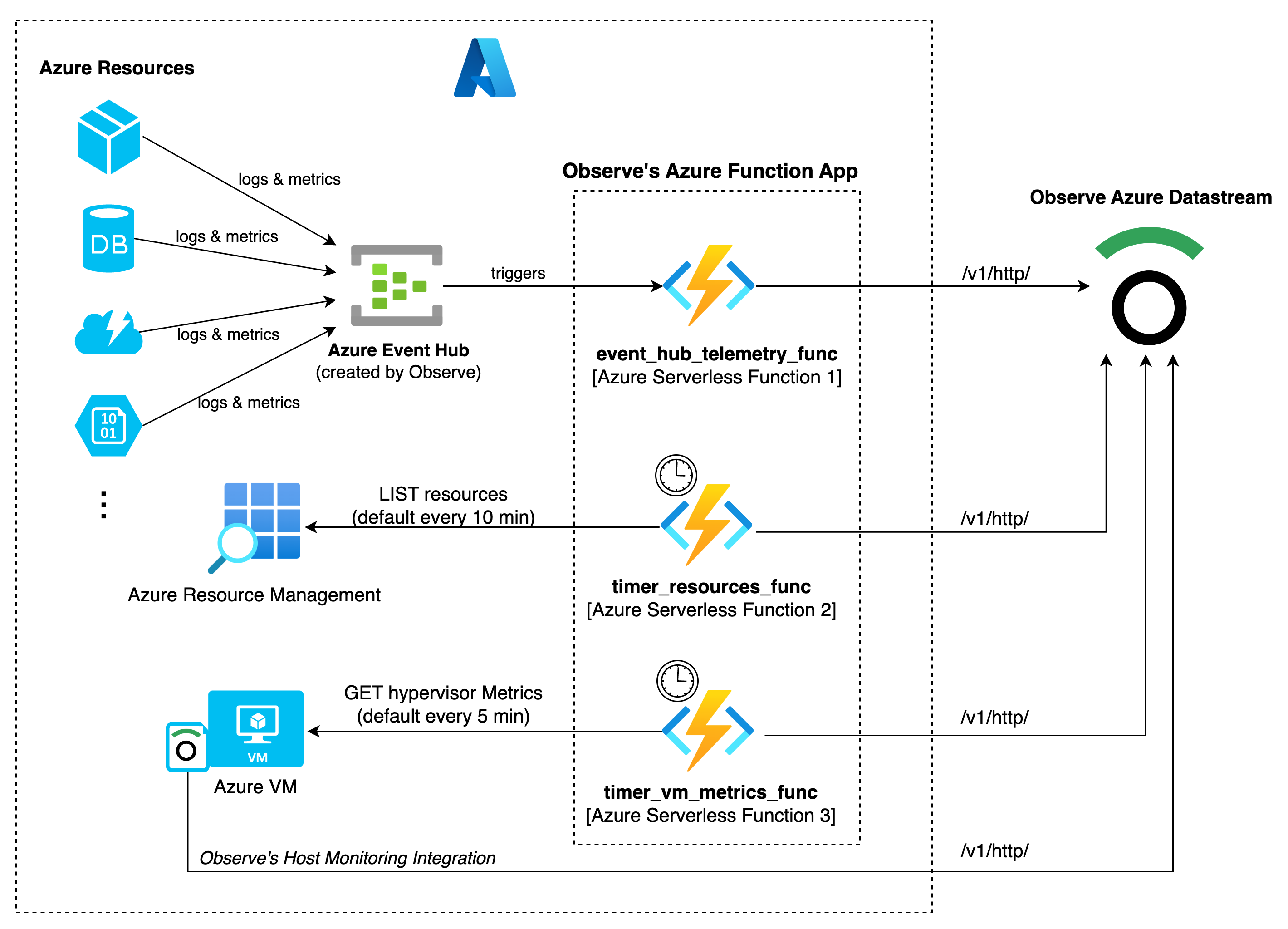
The Azure Function app contains three functions responsible for data collection:
-
event_hub_telemetry_func- captures the data sent to the Event Hub from the Azure resources Diagnostic settings. Event Hub triggers this function and forwards the data to Observe by Snowflake. -
timer_resources_func- returns all resources within the location (region) and the corresponding metadata. It runs on an assigned NCRONTAB schedule and set to every 10 minutes by default. -
timer_vm_metrics_func- returns virtual machine metrics from the hypervisor. It runs on an assigned NCRONTAB schedule and set to every 5 minutes by default.
Standard ingest sources
The Microsoft Azure app ingests the following types of data from a single location (region):
- Azure Active Directory (AD)
- Azure Functions
- Azure Kubernetes Service (AKS)
- Azure SQL Database
- Azure SQL Managed Instances
- Azure storage account
- Azure virtual machines
Installed Datasets
After shaping, the incoming data populates datasets such as the following:
-
AD
- Active Directory - Active Directory Logs which includes Audit Logs, Sign-In logs and Provisioning Logs
-
AKS
- AKS Clusters - AKS Cluster Logs and Metrics
-
App Services
- App Services - Overall App Service performance, usage, and tracing
-
Cognitive Services
- Cognitive Service - Usage and Performance of Cognitive Services, such as OpenAI services
-
Functions
- Function App - Overall FunctionApp performance and usage
- Functions - Function performance
-
SQL Database
- SQL Server - Servers SQL Databases employ
- SQL Database - Logs audit, deadlocks, error, query, timeout activity, and metrics such as query store runtime and wait statistics.
-
SQL Managed Instances
- SQL Managed Instance - Status and basic metrics of instances
- SQL Managed Instance Databases - Logs of errors and metrics, including query store runtime and wait statistics for databases running within SQL Managed Instances
-
Storage Account
- Storage Account - Basic info about storage account, logs about error and performance related to a Storage Account, blob and containers.
- Blob Service - Overall info about blob service, performance metrics and associated storage account.
- Blob Container - Overall info about blob container.
-
Virtual Machines
- Virtual Machine - Status and basic metrics of your virtual machines
- Virtual Machine Disk - Status and usage of allocated disks for your virtual machines
Updated about 1 month ago