

Configure your S3 bucket to receive data from Observe by Snowflake
Before you export data from Observe by Snowflake to your S3 bucket, you must prepare your S3 bucket as follows:
- Your bucket must be in the same AWS region as your Observe by Snowflake tenant. See Observe by Snowflake deployment regions.
- Your bucket policy must allow Observe by Snowflake to access your bucket.
Verify your S3 bucket's region
Your bucket must be in the same region as your Observe by Snowflake tenant. When creating a job, the Observe by Snowflake UI modal will display the region that your bucket must be located in.
To view the region your bucket is in, navigate to the bucket page in the Amazon S3 UI. Click the Properties tab. The bucket region is listed under AWS Region in the Bucket overview section:
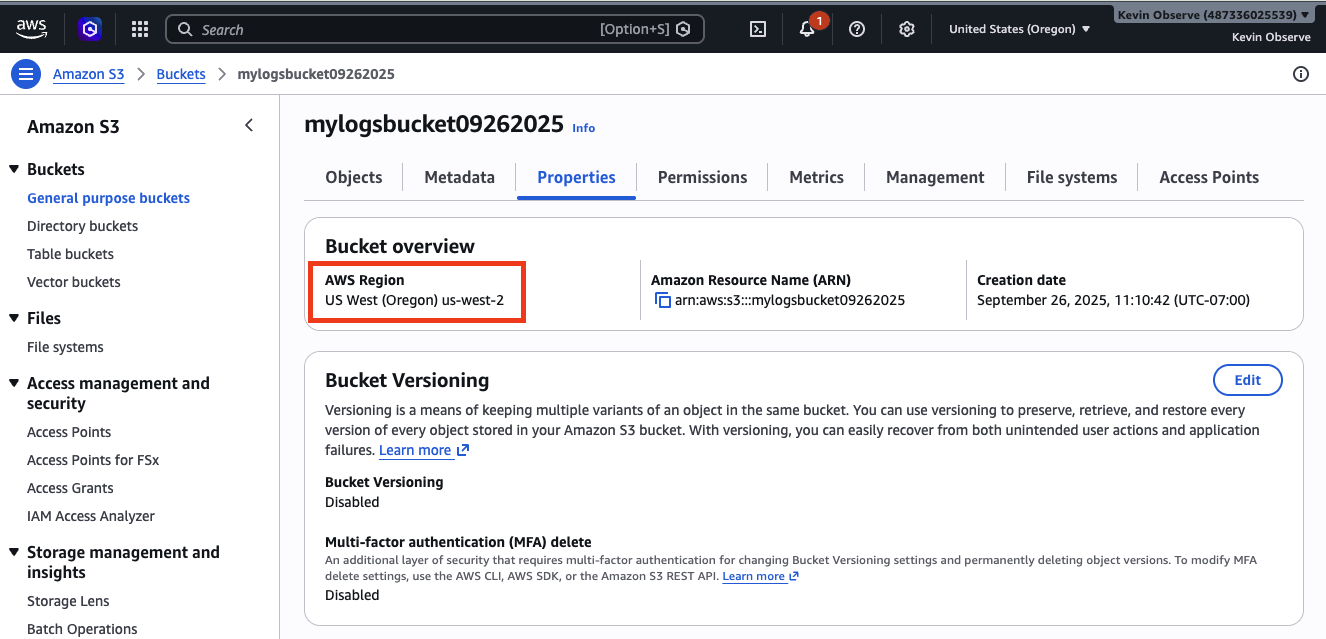
If your bucket is not in the same region, create a new S3 bucket to receive data from Observe by Snowflake.
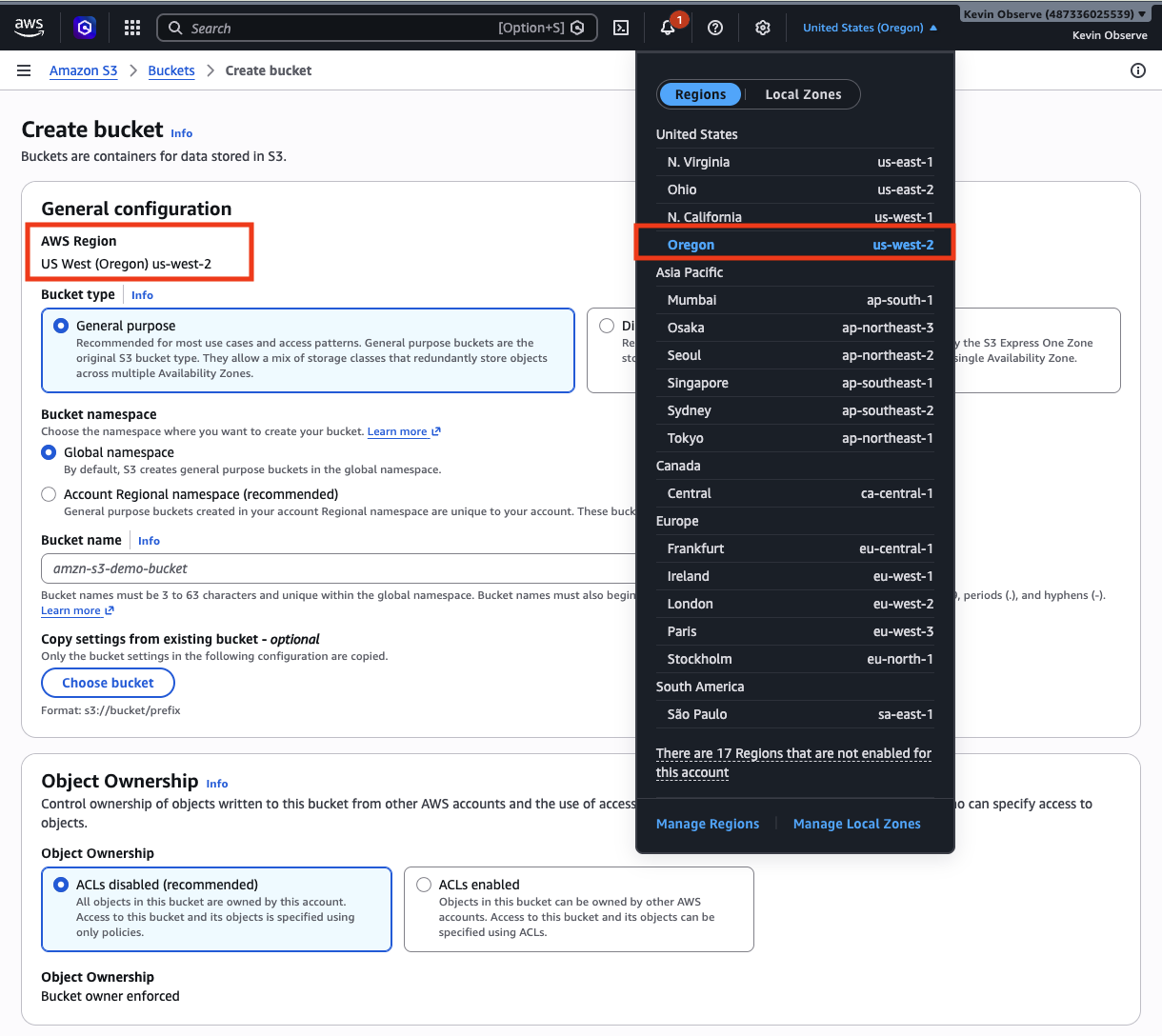
On the Create bucket page in the Amazon S3 UI, the region of the bucket can be configured by selecting from the drop-down menu at the top of the screen:
Configure your bucket policy
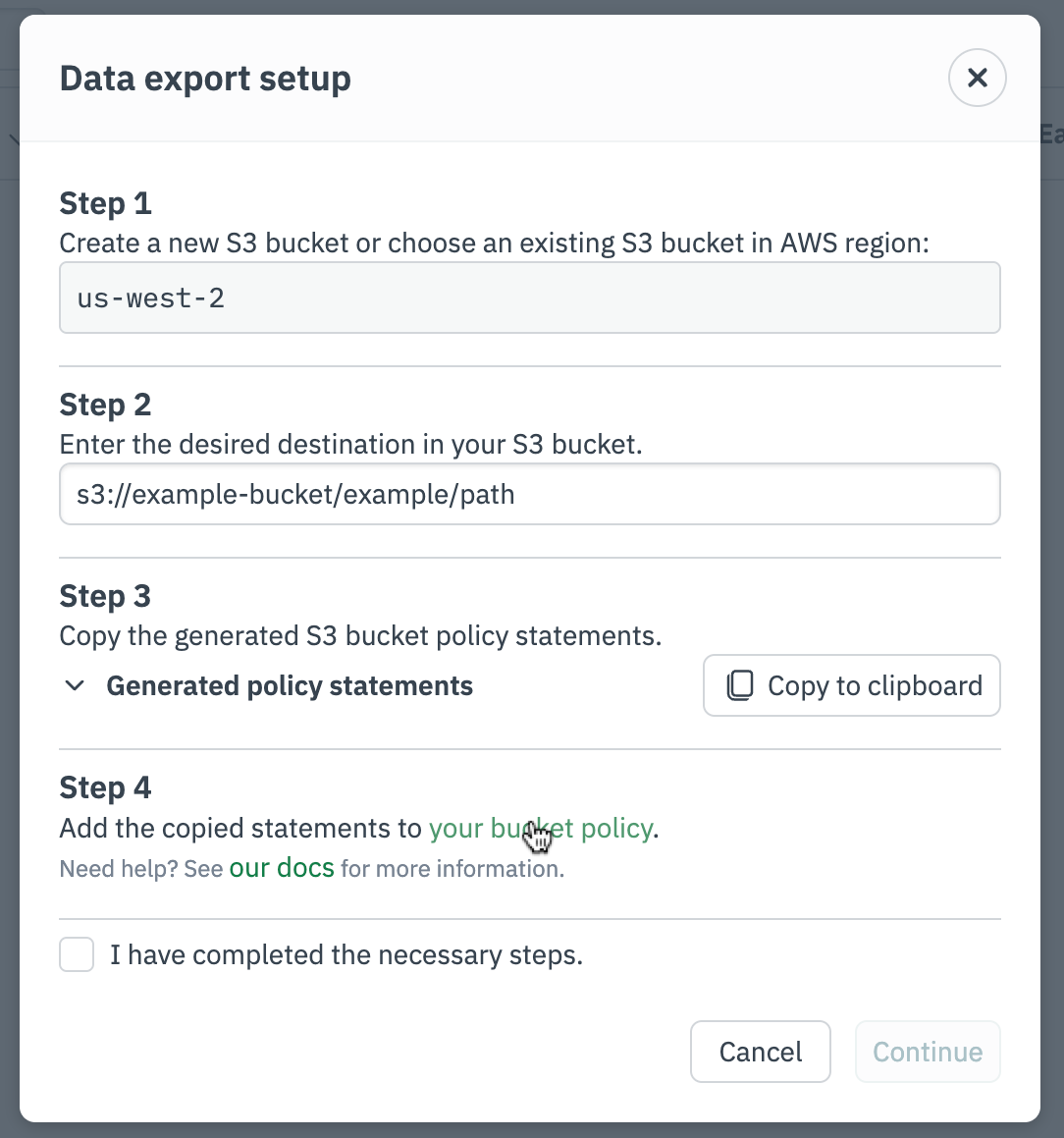
For the Data Export feature to work, your S3 bucket policy must allow Observe by Snowflake to access your bucket and perform several basic actions. This can be done by adding statements to your bucket policy. The Observe by Snowflake UI should generate the statements that you need to add to your policy. If you wish to write these statements manually, see Statement templates.
Access your bucket policy (via Observe by Snowflake UI)
The Observe by Snowflake UI will generate a link to the bucket policy editor in the AWS Console, provided you have entered a valid S3 bucket path.
Access your bucket policy (via AWS Console)
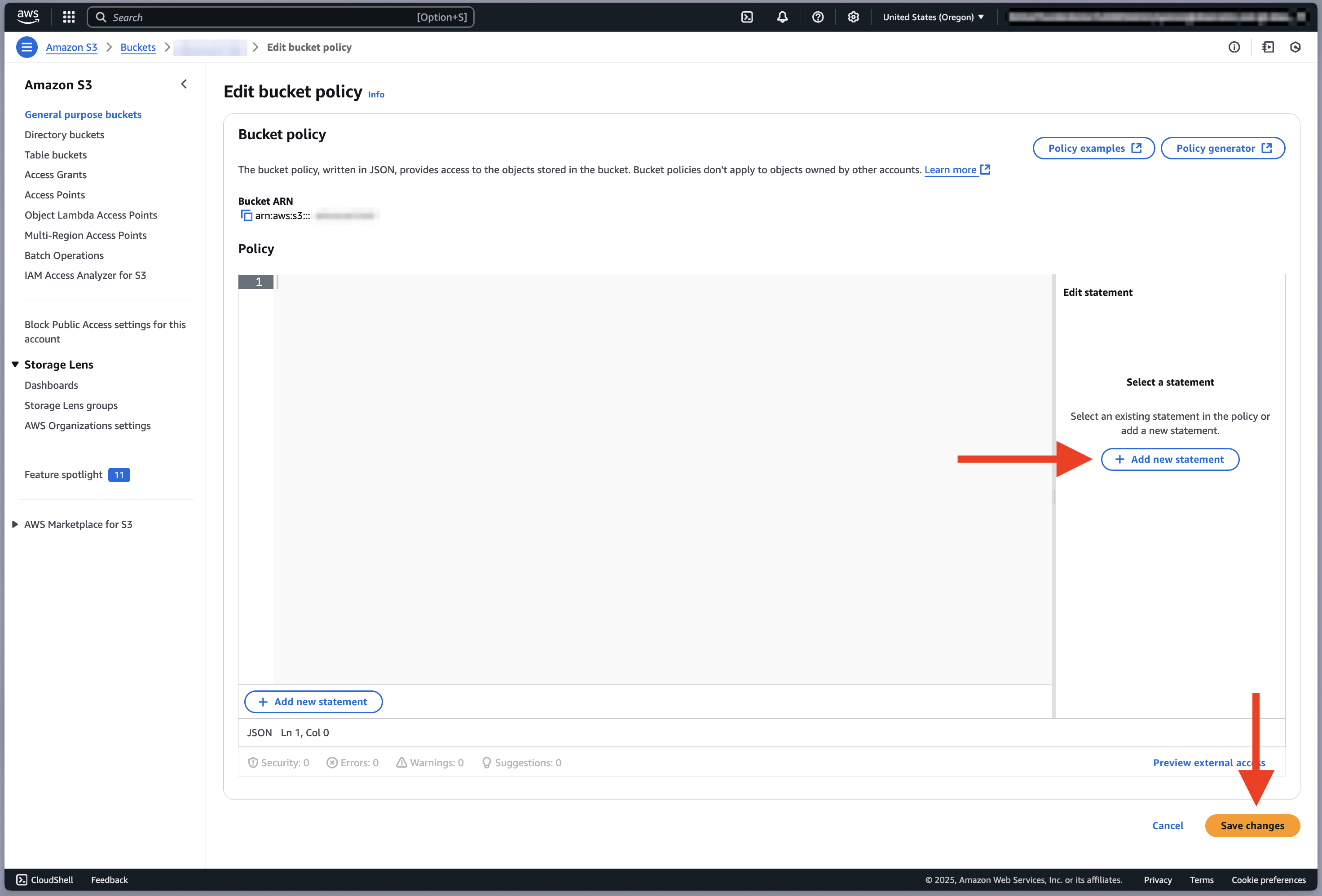
Alternatively, you can navigate to the bucket page in the Amazon S3 UI. Click the Permissions tab. Under Bucket policy, click Edit.
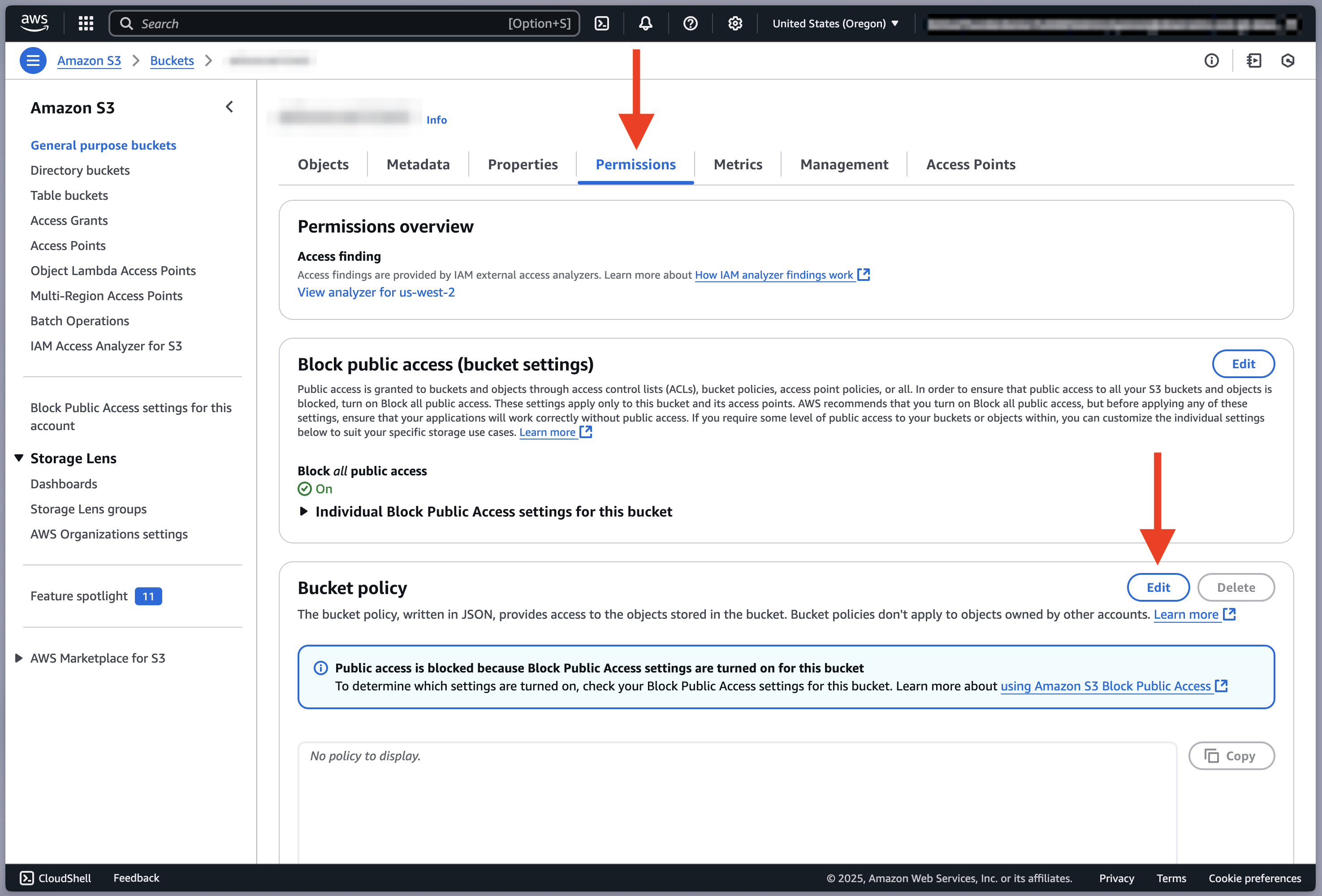
On the Edit bucket policy page, click Add new statement and add each of the statements to your bucket policy. These statements should be generated for you in the Observe by Snowflake UI, or you can fill them out manually from Statement templates. When you are done, click Save changes.
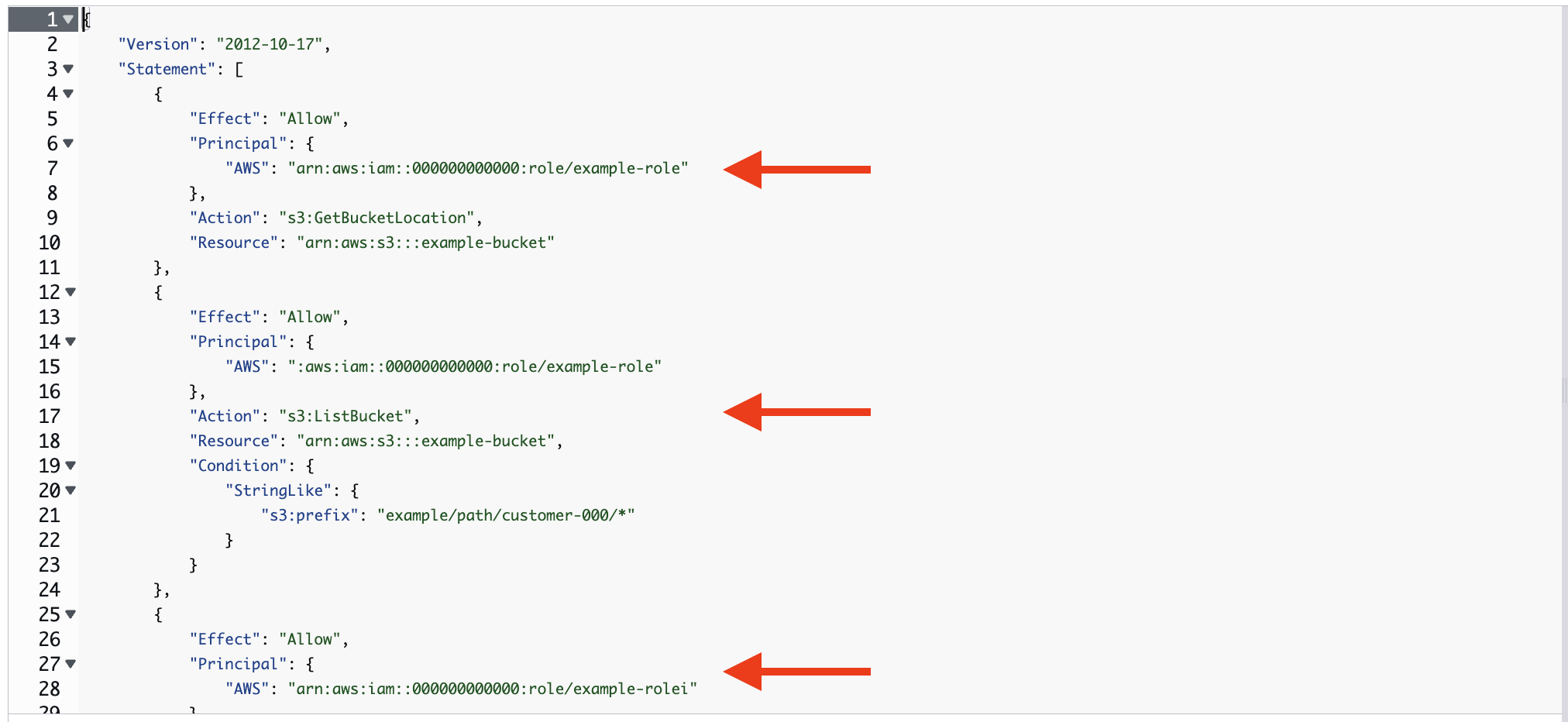
After adding the statements, your bucket policy should contains the three statements generated for you. It should look similar to the following:
Statement templates
To allow Observe by Snowflake to write data to your S3 bucket, add the following three statements to the bucket policy. If you are using the Observe by Snowflake UI, these statements should be generated for you automatically with the templated values filled in.
- Replace
<ROLE FROM OBSERVE UI>with the role provided in the Observe by Snowflake UI - Replace
<YOUR BUCKET NAME>with the name of your bucket - To only grant access to a specific sub-path of your bucket, use
<PATH>where indicated.
Statement to allow Observe by Snowflake to get your bucket's location
Allow Observe by Snowflake to get the location of your bucket.
{
  "Effect": "Allow",
  "Principal": {
    "AWS": "<ROLE FROM OBSERVE UI>"
  },
  "Action": "s3:GetBucketLocation",
  "Resource": "arn:aws:s3:::<YOUR BUCKET NAME>"
}
Statement to allow Observe by Snowflake to list your bucket's objects
Allow Observe by Snowflake to list the objects within your bucket.
{
  "Effect": "Allow",
  "Principal": {
    "AWS": "<ROLE FROM OBSERVE UI>"
  },
  "Action": "s3:ListBucket",
  "Resource": "arn:aws:s3:::<YOUR BUCKET NAME>",
  "Condition": {
    "StringLike": {
      "s3:prefix": "[<PATH>/]*"
    }
  }
}
Statement to allow Observe by Snowflake to write and delete objects
Allow Observe by Snowflake to write and delete objects from your bucket. Object deletion is only used in special error-handling cases to ensure no data is double-exported.
{
  "Effect": "Allow",
  "Principal": {
    "AWS": "<ROLE FROM OBSERVE UI>"
  },
  "Action": [
    "s3:PutObject",
    "s3:GetObject",
    "s3:GetObjectVersion",
    "s3:DeleteObject",
    "s3:DeleteObjectVersion"
  ],
  "Resource": "arn:aws:s3:::<YOUR BUCKET NAME>/[<PATH>/]*"
}
Statement to allow Observe by Snowflake to use a customer-managed KMS key
If your S3 bucket is encrypted with a customer-managed AWS KMS key (SSE-KMS), you must explicitly allow Observe by Snowflake to use that key. This is required in addition to the S3 bucket policy permissions.
Add the following statement to the KMS key policy associated with the bucket. This allows Observe by Snowflake to encrypt and decrypt objects written to the bucket.
{
    "Sid": "AllowObserveToUseKMSKeyForSpecificBucket",
    "Effect": "Allow",
    "Principal": {
        "AWS": "arn:aws:iam::<OBSERVE_AWS_ACCOUNT_ID>:root"
    },
    "Action": [
        "kms:Encrypt",
        "kms:Decrypt",
        "kms:ReEncrypt*",
        "kms:GenerateDataKey*",
        "kms:DescribeKey"
    ],
    "Resource": "*",
    "Condition": {
        "StringEquals": {
            "kms:EncryptionContext:aws:s3:arn": "arn:aws:s3:::<BUCKET_NAME>"
        }
    }
}
Updated 14 days ago