

Uninstall the GitHub app
Uninstall the Github poller
To uninstall the GitHub poller, follow the instructions below:
- From the GitHub app details page, navigate to the Connections tab. Under Existing connections, look for any pollers. Any webhook connections continue to work properly without intervention and can be ignored for this upgrade.
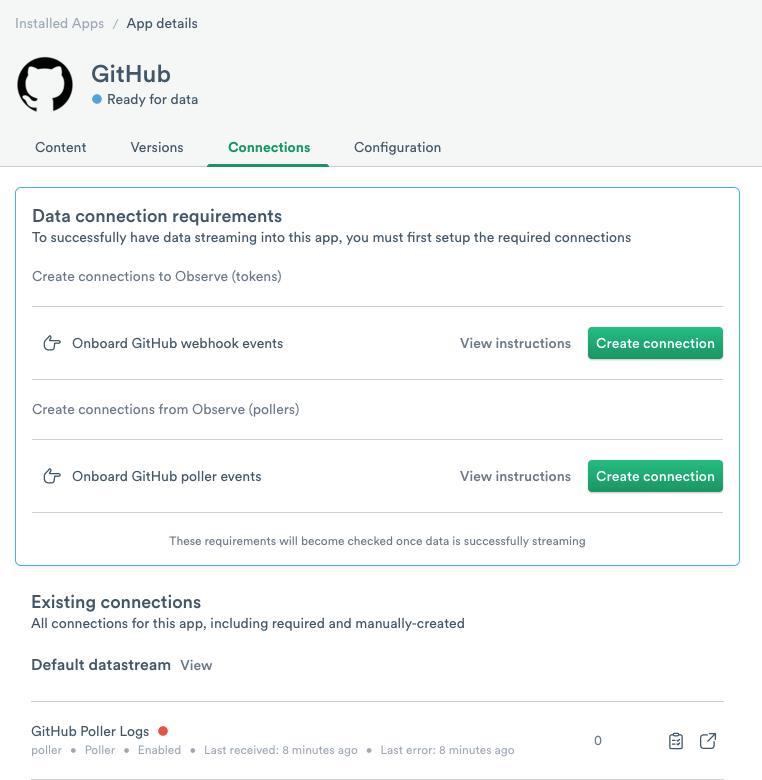
- Click on the name of an existing poller to open it. You can then click on the drop-down menu on the top right and select Delete.

You can also delete the personal GitHub API token created in GitHub.
Uninstall the GitHub webhook
To delete the GitHub webhook contents, delete the associated token in your Observe by Snowflake workspace along with deleting the webhook from your GitHub organization. For token deletion, see Manage tokens.
For more information about GitHub webhooks, see Creating webhooks in the GitHub documentation.
Uninstall the GitHub app
To uninstall the GitHub app from your Observe by Snowflake workspace, follow the instructions located on the Observe by Snowflake apps page.
Updated about 1 month ago
Did this page help you?