

AWS-at-scale data ingestion
This document describes how you can get your AWS data into Observe by Snowflake from an AWS-at-scale environment, with multiple accounts across multiple regions, resulting in potentially hundreds of separate account-region combinations.
AWS-at-scale data ingestion architecture
Such a solution requires having all of your AWS child accounts write to a single Observability account:
- Write your CloudWatch logs and AWS configurations in one Observability account that holds the central S3 buckets. Then, use CloudFormation or Terraform to push from those central buckets to Observe by Snowflake via Filedrop.
- Use Terraform to pull CloudWatch metrics via the Observe by Snowflake poller. Use one poller for each AWS account.
For example:
flowchart LR
%% Direction: Left to Right (Accounts -> Observability -> Observe)

%% =========================
%% SOURCE AWS ACCOUNTS
%% =========================
subgraph SourceAccounts["AWS Child Accounts"]
direction TB

    Prod["Prod Account"]
    Staging["Staging Account"]
    NAcct["N Account"]

end

%% =========================
%% OBSERVABILITY ACCOUNT
%% =========================
subgraph Observability["Observability Account"]
direction TB

    S3Logs["S3 (cwl-logs-central)"]
    S3Config["S3 (aws-config-central)"]
    Poller["Metrics Poller (per account)"]

end

%% =========================
%% OBSERVE PLATFORM
%% =========================
Observe["Observe"]

%% =========================
%% DATA FLOWS
%% =========================

%% CloudWatch Logs and Subscription Filters
Prod -->|"CloudWatch Logs → CWL Subscription Filter (per stream/group)"| S3Logs
Staging -->|"CloudWatch Logs → CWL Subscription Filter (per stream/group)"| S3Logs
NAcct -->|"CloudWatch Logs → CWL Subscription Filter (per stream/group)"| S3Logs

%% CloudWatch Metrics (read by Poller in each account)
Prod -->|"CloudWatch Metrics (read by Poller)"| Poller
Staging -->|"CloudWatch Metrics (read by Poller)"| Poller
NAcct -->|"CloudWatch Metrics (read by Poller)"| Poller

%% AWS Config delivering to central S3
Prod -->|"AWS Config → delivers to central S3 (cross-account)"| S3Config
Staging -->|"AWS Config → delivers to central S3 (cross-account)"| S3Config
NAcct -->|"AWS Config → delivers to central S3 (cross-account)"| S3Config

%% S3 Buckets feeding into Observe
S3Logs -->|"Filedrop"| Observe
S3Config -->|"Filedrop"| Observe

%% Poller sending metrics
Poller -->|"Metrics → Observe"| Observe
Terraform and CloudFormation resources
View the Terraform and CloudFormation resources you will need to set up this data ingestion:
Terraform
- CloudWatch Logs, AWS Config: https://registry.terraform.io/modules/observeinc/collection/aws/latest/submodules/stack
- CloudWatch Metrics: Poller https://registry.terraform.io/providers/observeinc/observe/latest/docs/resources/poller#cloudwatch-metrics-poller
CloudFormation
Get CloudWatch logs into Observe by Snowflake
Consolidate your CloudWatch logs to land in one S3 bucket in an AWS Observability account. Observe by Snowflake can ingest the logs from that account using the Observe by Snowflake Forwarder, deployed in the same AWS account.
Perform the following tasks to set this up:
- Create a KMS-encrypted S3 bucket, such as
cwl-logs-central-<org>, with the desired lifecycle rules, such as 30–90 days hot with Glacier or Glacier Deep Archive storage classes. Be sure to check whether any KMS key policies in the Observability account are denying the S3 bucket objects from being copied when files are sent to our Filedrop. - In each source account, connect your CloudWatch log subscription filters to a Kinesis Firehose (same account) that delivers to the central S3 bucket (cross-account role).
- In the Observability account, deploy Add Data for AWS (CloudFormation) or Terraform stack module to read from
cwl-logs-central-*and send to Filedrop.
Note that Filedrop prefers larger compressed objects rather than many small files:
- Target up to 1 GB per file for optimal ingest.
- Each single cell or field inside the file must be at most 16 MB.
- Use compression, such as GZIP, to minimize PUT operations and reduce costs.
- Balance Firehose buffering (size vs. interval) so you generate fewer, larger objects without delaying data too much.
Get AWS configurations into Observe by Snowflake
Get all your AWS accounts to send their configuration snapshots and change notifications to a single S3 bucket in the Observability account.
Perform the following tasks to set this up:
- Enable the AWS configuration in each account or region with delivery channel to
aws-config-central-<org>using a cross-account bucket policy. Make sure both the bucket policy and the role trust in source accounts are set; it’s common to do one and forget the other. - In the Observability account, deploy Add Data for AWS (CloudFormation/Terraform) to pick up from that bucket and send to Filedrop.
Get CloudWatch metrics into Observe by Snowflake
Configure a lightweight metrics poller in each AWS account to read the CloudWatch metrics and ship the data to Observe by Snowflake.
Perform the following tasks to set this up:
- With Terraform, deploy the poller module once per account with least-privilege IAM, read-only CloudWatch permissions.
- Scope namespaces, such as
AWS/EC2,AWS/ELB,AWS/Lambda, or custom, to control cost and volume. Be careful using namespaces with many dimensions, as this can cause costs to spike quickly. - Centralize config via Terraform variables and tag resources. For example:
Owner=Observability,DataClass=Metrics.
Can I use Control Tower?
This section contains additional information and context to help you decide if you want to use Control Tower to setup a central Observability account.
How does Control Tower fit into this picture?
Control Tower sets up a multi-account AWS organization with guardrails, centralized governance, and predefined “landing zone” accounts. Since Control Tower already creates one central account for storing logs and config, it is possible to extend the Control Tower Log Archive account to also serve as the central Observability account.
Even if you have Control Tower, you may still want to create a separate dedicated Observability account in the following cases:
- You don’t want to overload the log archive with additional ingestion pipelines.
- You want to clearly separate compliance logs (retention-focused) from observability telemetry (operational, shorter retention, more frequent query).
- Control Tower stores your CloudTrail logs and AWS config from multiple regions in a single bucket. In order to get logs from each region into their respective Observe by Snowflake tenant, you must set up additional buckets to segregate the logs and config for each region. See Get data from multiple regions into their respective tenants.
In either case, the central S3 buckets for CloudWatch logs exports and AWS config snapshots reside in one chosen account, and cross-account delivery is handled by bucket policies and roles.
Does Control Tower include all CloudWatch logs from all AWS accounts?
The Control Tower Log Archive account is not a full CloudWatch logs aggregator.
The Log Archive account always collects CloudTrail and optionally Config / VPC Flow Logs, but it does not automatically include all CloudWatch Logs from member accounts. If you want that, you need to set up subscriptions/export pipelines yourself.
What Control Tower Log Archive does by default
- When you set up Control Tower, a Log Archive account is created and Organization-level CloudTrail is configured.
- All member accounts in the organization send their CloudTrail logs (and optionally VPC Flow Logs, Config snapshots, etc.) into the central S3 bucket in the Log Archive account.
- This is focused on compliance and governance logs (security + audit trail).
What Control Tower doesn't include by default
- Control Tower does not automatically centralize all CloudWatch Logs log groups, such as Lambda logs, ECS logs, and application logs.
- To get those into the Log Archive account, you must configure either of the following:
- Log subscriptions, such as CloudWatch Logs → Kinesis Firehose → central S3 in Log Archive.
- Centralized logging solutions, such as AWS Centralized Logging solution, or custom Terraform/CloudFormation.
Control Tower doesn’t know which CloudWatch log groups you care about, so you have to set up forwarding yourself.
How AWS config fits
- Control Tower can enable AWS Config in governed accounts and deliver Config snapshots and compliance records into the Log Archive account’s S3 bucket.
- This is separate from CloudWatch Logs, only Config data is included.
Pros and cons to consider
This section compares using a Control Tower Log Archive account versus creating a dedicated Observability account for centralizing logs, metrics, and config.
Control Tower Log Archive account
Review the following considerations for using the Control Tower Log Archive account:
| Pros | Cons |
|---|---|
|
|
Dedicated Observability account
Review the following considerations for create your own dedicated Observability account:
| Pros | Cons |
|---|---|
|
|
Recommendations
Review the following recommendations based on your organization's size and priorities:
| Your org | Recommendation |
|---|---|
| You are a small and/or compliance-driven org. | Stick with Control Tower's Log Archive account, and extend it slightly to add S3 buckets and Firehose targets for CloudWatch logs and config if you’re OK with compliance retention rules and shared ownership. |
| You are a larger and/or platform-driven org. | Stand up a dedicated Observability account for telemetry pipelines for logs, metrics, and config, while still letting Control Tower’s Log Archive account focus on compliance. This separation avoids operational vs. compliance conflicts. |
| You're a little of both |
|
Get data from multiple regions into their respective tenants
This section describes how you can get data from multiple regions into separate Observe by Snowflake tenants. For example:
- Get AWS EU data into the EU tenant only.
- Get AWS UK data into the UK tenant only.
- Get AWS US data into the US tenant only.
To accomplish this, use one of the following options:
Use dedicated observability accounts
You can configure a dedicated observability account for each region. Each region has its own observability account, such as:
- Observability-US
- Observability-EU
- Observability-UK
In this setup, each region writes to its regional Observe by Snowflake tenant. This is a good long-term solution.
Use replication by region
To use replication by region:
- Keep Control Tower’s single source bucket.
- Add region-filtered replication into per-region buckets, such as:
- cloudtrail-us
- cloudtrail-eu
- cloudtrail-uk
- Attach each bucket to its respective Observe by Snowflake tenant.
To do this, use S3 replication rules with prefix filters such as:
AWSLogs/<account-id>/CloudTrail/us-east-1/
AWSLogs/<account-id>/CloudTrail/eu-west-1/
Do the same for AWS config region prefixes.
Use a single S3 bucket with selective forwarding by object key
To use a single S3 bucket with selective forwarding by object key:
- Keep Control Tower’s single source S3 bucket containing CloudTrail and AWS config data from all accounts and regions.
- Deploy one Observe by Snowflake S3 Forwarder per region per Observe by Snowflake tenant:
- Forwarder-US
- Forwarder-EU
- Forwarder-UK
- Each forwarder ingests only the objects that belong to its region, based on S3 object key patterns.
- Each forwarder sends data to its respective Observe by Snowflake tenant. For more information:
- Filedrop uses the object content type to determine how to parse a file. You can use the
ContentTypeOverridesparameter to specify the content type of a file. See Filtering Object Keys in the Observe by Snowflake Forwarder Application documentation on GitHub. - See Comparison operators for use in event patterns in Amazon EventBridge in the AWS documentation to learn about the comparison operators you can use to match event values in Amazon EventBridge event patterns. Some additional examples are provided later in this section.
- Filedrop uses the object content type to determine how to parse a file. You can use the
- Attach the same S3 bucket to multiple forwarders.
- Configure S3 bucket notifications, SNS subscriptions, or EventBridge rules so object-created events are delivered to the forwarders.
- Given it is not always possible to filter events at their source, the Forwarder function restricts processing to objects that match a set of key patterns provided through the
SourceObjectKeysparameter. See Patterns for SourceObjectKeys . - Apply similar key-pattern filtering for AWS config objects, based on their region-specific prefixes.
Patterns for SourceObjectKeys
This section describes how you can use simple, repeatable patterns that work with a small number of Filedrop setups. Configure each forwarder with SourceObjectKeys to restrict processing to region-specific object key patterns. For example:
AWSLogs/*/CloudTrail/us-*/*
AWSLogs/*/CloudTrail/eu-west-2/*
AWSLogs/*/CloudTrail/eu-*/*
Send data from selective AWS regions to an Observe by Snowflake tenant
Suppose you have the following directory structure for your S3 bucket (aws-controltower-logs-XXXXXXXXXXXX-us-east-1):
s3://aws-controltower-logs-XXXXXXXXXXXX-us-east-1/<org-id>/AWSLogs/<org-id>/<account-id>/CloudTrail/eu-central-1/
  s3://aws-controltower-logs-XXXXXXXXXXXX-us-east-1/<org-id>/AWSLogs/<org-id>/<account-id>/CloudTrail/eu-north-1/
  s3://aws-controltower-logs-XXXXXXXXXXXX-us-east-1/<org-id>/AWSLogs/<org-id>/<account-id>/CloudTrail/eu-west-1/
  s3://aws-controltower-logs-XXXXXXXXXXXX-us-east-1/<org-id>/AWSLogs/<org-id>/<account-id>/CloudTrail/eu-west-2/
  s3://aws-controltower-logs-XXXXXXXXXXXX-us-east-1/<org-id>/AWSLogs/<org-id>/<account-id>/CloudTrail/eu-west-3/
  s3://aws-controltower-logs-XXXXXXXXXXXX-us-east-1/<org-id>/AWSLogs/<org-id>/<account-id>/CloudTrail/us-east-1/
  s3://aws-controltower-logs-XXXXXXXXXXXX-us-east-1/<org-id>/AWSLogs/<org-id>/<account-id>/CloudTrail/us-east-2/
  s3://aws-controltower-logs-XXXXXXXXXXXX-us-east-1/<org-id>/AWSLogs/<org-id>/<account-id>/CloudTrail/us-west-1/
  s3://aws-controltower-logs-XXXXXXXXXXXX-us-east-1/<org-id>/AWSLogs/<org-id>/<account-id>/CloudTrail/us-west-2/
Use any of the following patterns for SourceObjectKeys to forward all data from the us-west-2 region in the aws-controltower-logs-<account-id>-us-east-1 S3 bucket to an Observe by Snowflake tenant:
<org-id>/AWSLogs/*/*/CloudTrail/us-west-2/*<org-id>/AWSLogs/*/CloudTrail/us-west-2/**/AWSLogs/*/CloudTrail/us-west-2/**/us-west-2/*Use any of the following patterns for SourceObjectKeys to send all data from the US regions in the aws-controltower-logs-<account-id>-us-east-1 S3 bucket to an Observe by Snowflake tenant:
*/AWSLogs/*/CloudTrail/us-**/us-*You can apply similar key-pattern filtering for AWS config objects, based on their region-specific prefixes.
Send data from multiple US regions to a US Observe by Snowflake tenant
Suppose you want to send data from the following US regions to a US Observe by Snowflake tenant:
| Code | Name | Geography |
|---|---|---|
| us-east-1 | US East (N. Virginia) | United States of America |
| us-east-2 | US East (Ohio) | United States of America |
| us-west-1 | US West (N. California) | United States of America |
| us-west-2 | US West (Oregon) | United States of America |
Perform the following tasks:
- Create one Filedrop from the Observe by Snowflake US tenant.
- Create one forwarder stack with
*/us-*for theSourceObjectKeys. Make sure you pick the region where your S3 bucket is located.
Send data from multiple EU and ME regions to an EU Observe by Snowflake tenant
Suppose you want to send data from the following EU regions and Middle East regions to an EU Observe by Snowflake tenant
| Code | Name | Geography |
|---|---|---|
| eu-central-1 | Europe (Frankfurt) | Germany |
| eu-west-1 | Europe (Ireland) | Ireland |
| eu-south-1 | Europe (Milan) | Italy |
| eu-west-3 | Europe (Paris) | France |
| eu-south-2 | Europe (Spain) | Spain |
| eu-north-1 | Europe (Stockholm) | Sweden |
| eu-central-2 | Europe (Zurich) | Switzerland |
| me-south-1 | Middle East (Bahrain) | Bahrain |
| me-central-1 | Middle East (UAE) | United Arab Emirates |
Perform the following tasks:
- Create two filedrops (Forwarder-EU1, Forwarder-EU2) from the EU Observe by Snowflake tenant.
- Use information from the Forwarder-EU1 to create one forwarder stack with
*/eu-c*,*/eu-s*,*/eu-n*for theSourceObjectKeys. Make sure you pick the region where your S3 bucket is located. - Use information from the Forwarder-EU2 to create another forwarder stack with
*/eu-west-1/*,*/eu-west-3/*,*/me*for theSourceObjectKeys. Make sure you pick the region where your S3 bucket is located.
- Use information from the Forwarder-EU1 to create one forwarder stack with
Send data from a UK region to a UK Observe by Snowflake tenant
Suppose you want to send data from the following UK region to an Observe by Snowflake UK tenant
| Code | Name | Geography |
|---|---|---|
| eu-west-2 | Europe (London) | United Kingdom |
Perform the following tasks:
- Create one filedrop from the Observe by Snowflake UK tenant
- Create one forwarder stack with
*/eu-west-2/*for theSourceObjectKeys. Make sure you pick the region where your S3 bucket is located.
Frequently-asked questions for SourceObjectKeys patterns
-
Can I use a single pattern like
*/eu-c*,*/eu-s*,*/eu-n*,*/eu-west-1/*,*/eu-west-3/*,*/me*forSourceObjectKeys?No.
SourceObjectKeysin the forwarder stack is used to generate EventBridge matching rules. Complex patterns like/eu-c*,*/eu-s*,*/eu-n*,*/eu-west-1/*,*/eu-west-3/*,*/me*are not supported and will cause EventBridge validation errors, resulting in the forwarder stack failing to create.
Resource handler returned message: "Event pattern is not valid. Reason: Rule is too complex - try using fewer wildcard characters or fewer repeating character sequences after a wildcard character (Service: EventBridge, Status Code: 400, Request ID: 567cfc88-88ff-41ec-9119-5f87d1e718d7) (SDK Attempt Count: 1)" (RequestToken: cebdf1ba-9f7c-0a1e-ba58-aecf88206ed1, HandlerErrorCode: InvalidRequest)
-
For the EU forwarder stack, can I use two forwarder stacks with a single Filedrop?
We do not recommend this. When a Filedrop is created using an IAM role that does not yet exist (for example,
arn:aws:iam::123456789012:role/observe-forwarder-us-filedrop), the Filedrop policy allows only that specific IAM role to send data. When you setobserve-forwarder-usas theNameOverridein the forwarder stack, the stack attempts to create an IAM role named<NameOverride>-filedrop(e.g.,observe-forwarder-us-filedrop). If you then try to create a second forwarder stack with the sameNameOverride, the stack will fail because the IAM role already exists. -
If I need to add a new region that doesn’t match the existing patterns, what should I do?
Create a new Filedrop and a new forwarder stack, using a
SourceObjectKeyspattern that matches the new region.
Example of selective forwarding by object key
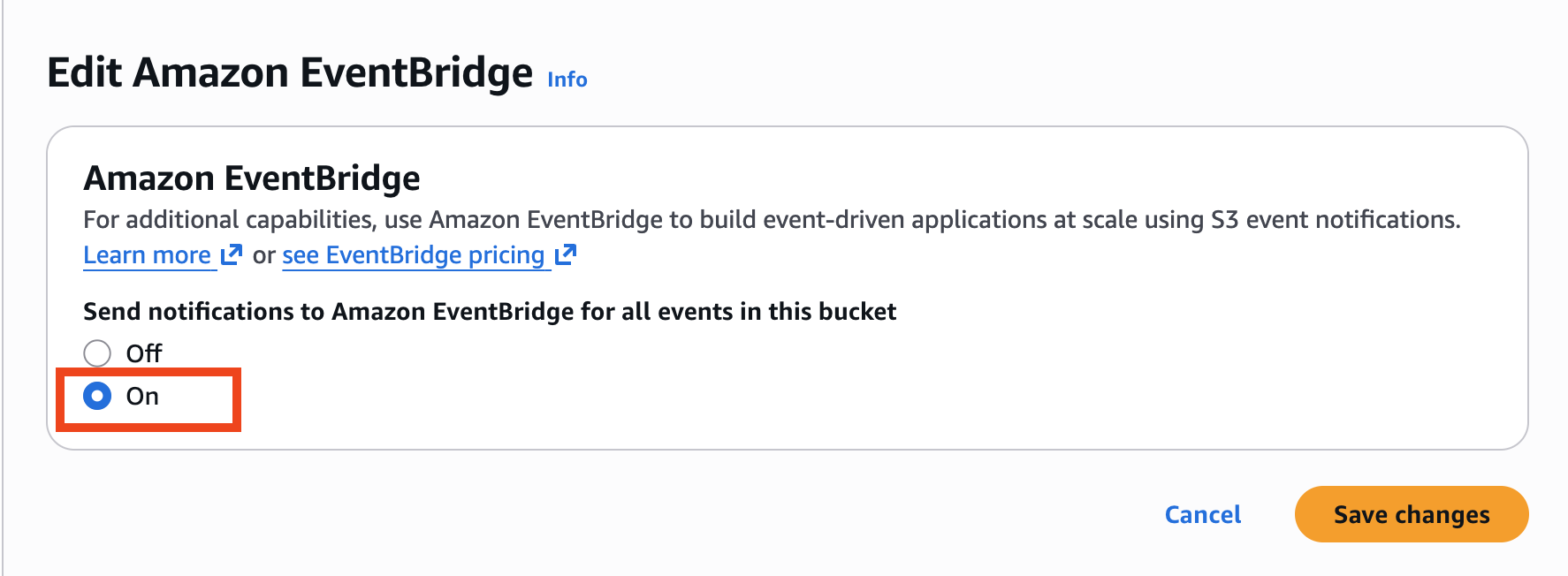
Begin by enabling EventBridge notification for this S3 bucket.
-
Click on the name of your S3 bucket, then click Properties and scroll down to Amazon EventBridge.
-
Click Edit, then click On.
-
Click Save changes.
Next, create a Filedrop from an Observe by Snowflake tenant in the U.S.
-
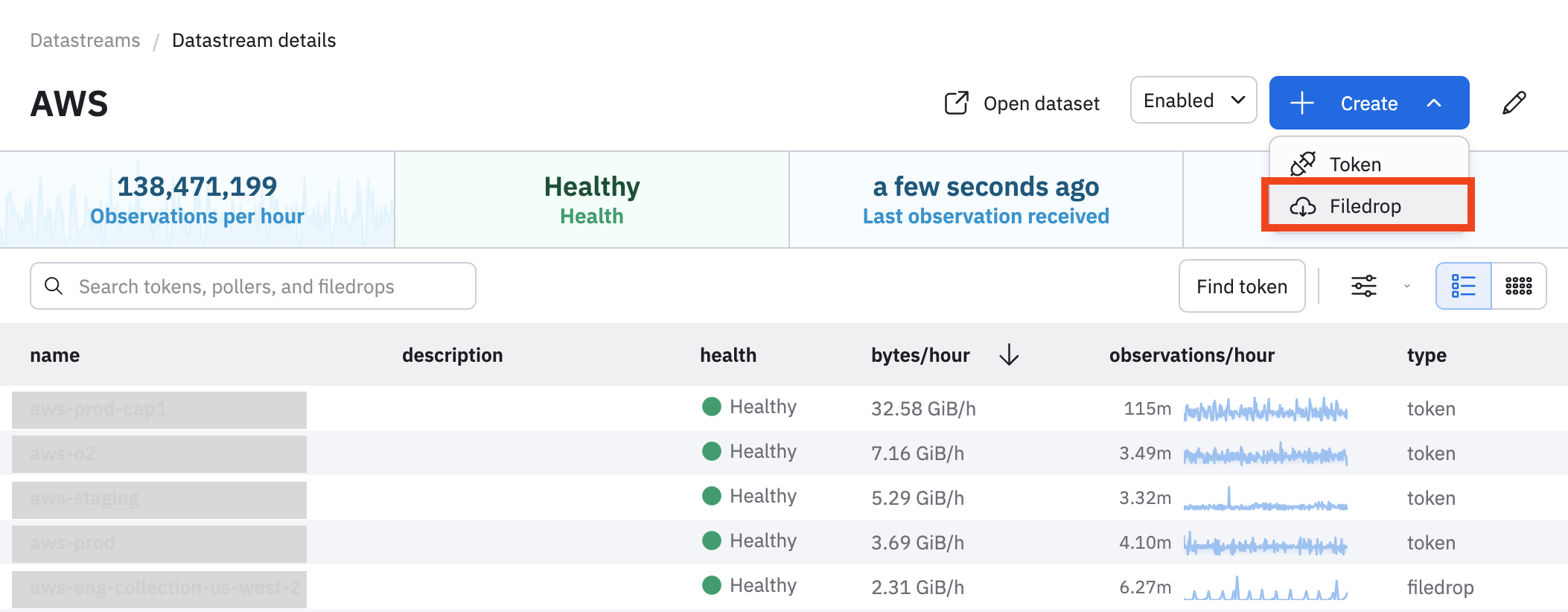
In Observe by Snowflake, select Data & integrations > Datastreams.
-
Find and click on the name of your AWS Datastream.
-
Click Create > Filedrop.
-
Specify an AWS IAM Role that doesn’t exist yet. You will use this IAM Role for Filedrop. Make sure your role includes -filedrop as a suffix. For example:
arn:aws:iam::<account-id>:role/observe-forwarder-us-filedrop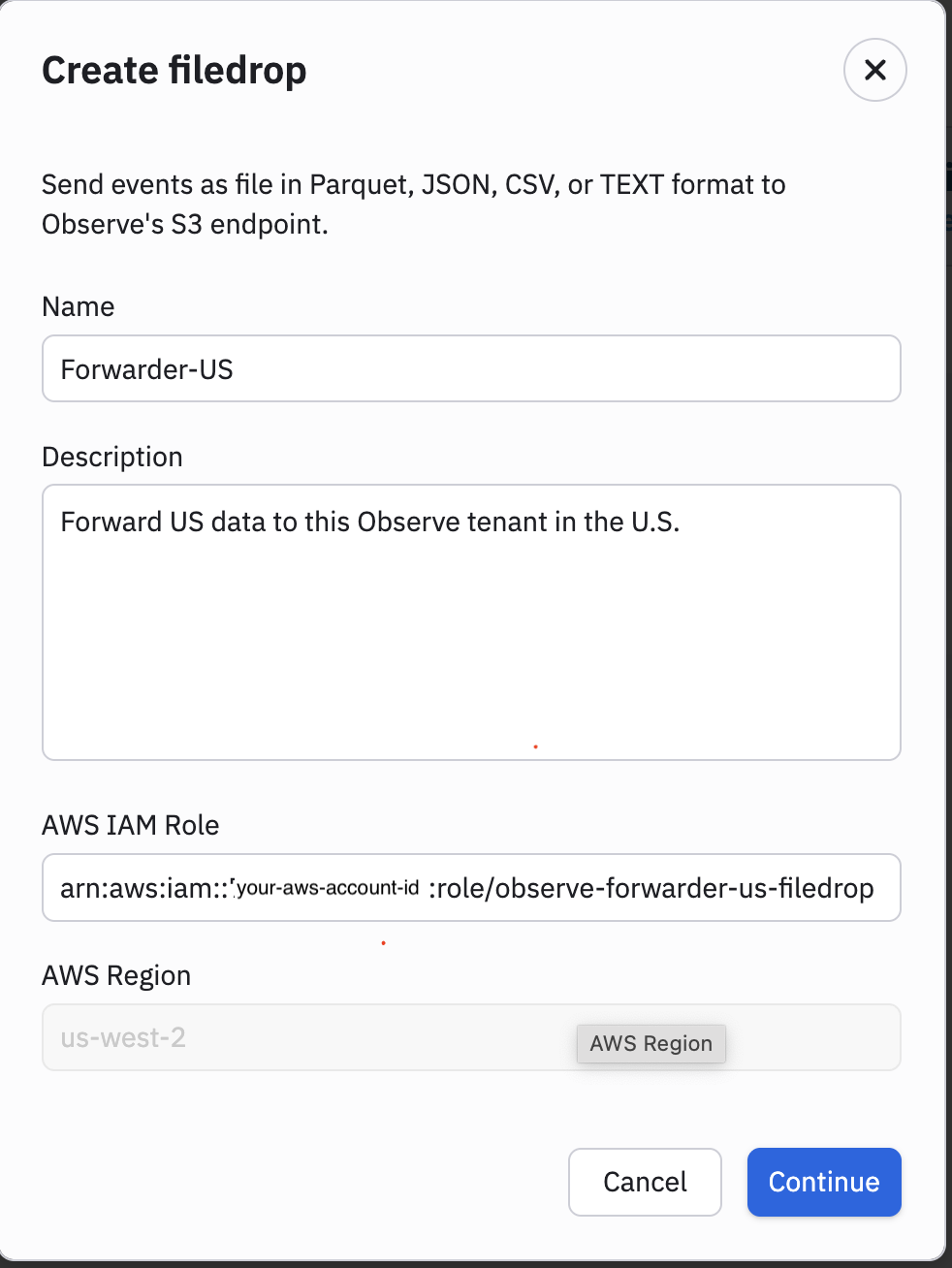
-
Click Continue.
Pick the forwarder and configure the CloudFormation template
Next, pick the correct forwarder from AWS SAM Applications for Observe Inc. Click on the name of the forwarder. In this example, we select us-west-2. Make sure you pick the region where your S3 bucket is located.
We will let this CloudFormation template to create the IAM Role observe-forwarder-us-filedrop.
-
Specify Forwarder-US as the stack name, to match the Filedrop name.
-
Specify the DestinationUri, such as
s3://<account-id>-dxy93iiockazxwysts75t8ithjdzousw2a-s3alias/ds15R4AZjaagH4xGylNv/. You can find this in your Filedrop details. For example: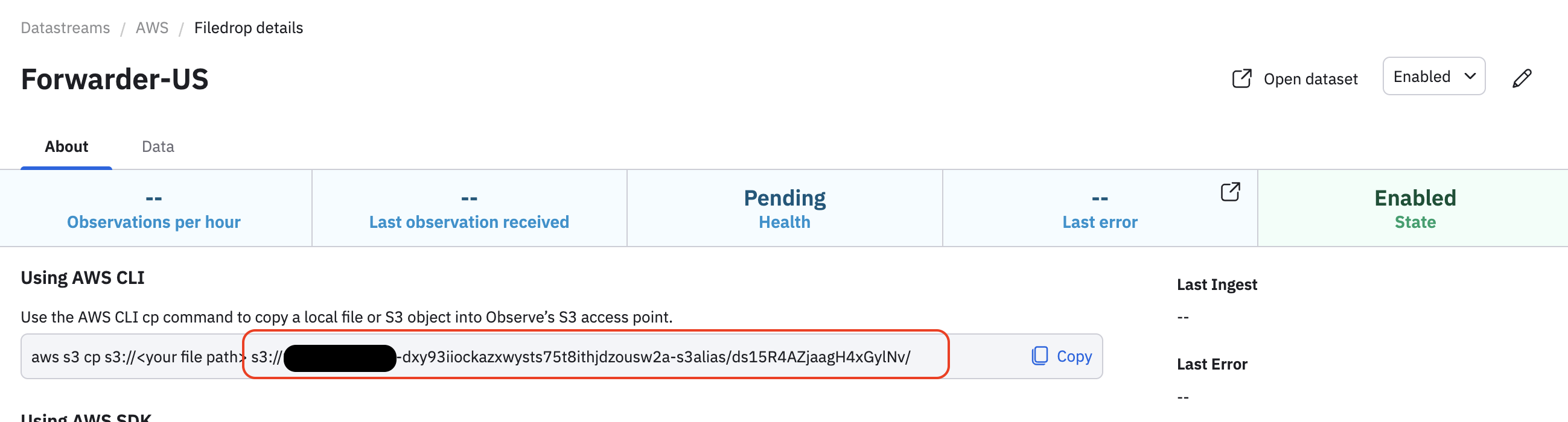
-
Specify the DataAccessPointArn, such as
arn:aws:s3:us-west-2:<account-id>:accesspoint/<access-point-id>. You can find this in your Filedrop details. For example: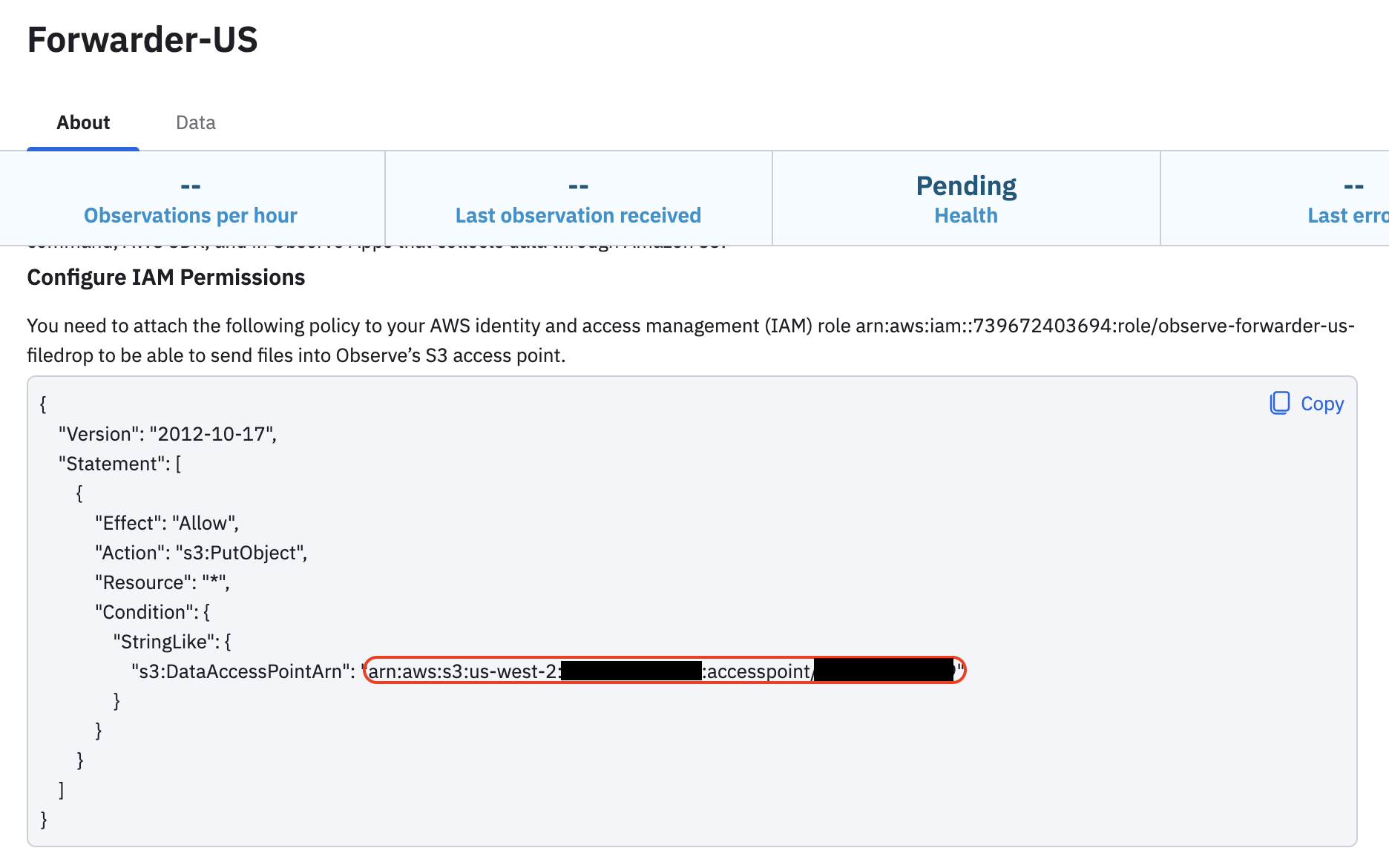
-
Specify the NameOverride as observe-forwarder-us. This is the IAM Role name we specified while creating a Filedrop without the -filedrop suffix.
-
Specify a SourceBucketNames. This is the name of your S3 bucket.
-
Specify the SourceObjectKeys. For example:
AWSLogs/*/Config/us-west-2/*The SourceObjectKeys define prefix and/or suffix filters for S3 object keys (file paths / names). This example matches any AWS config records in us-west-2.
-
Click Create stack.
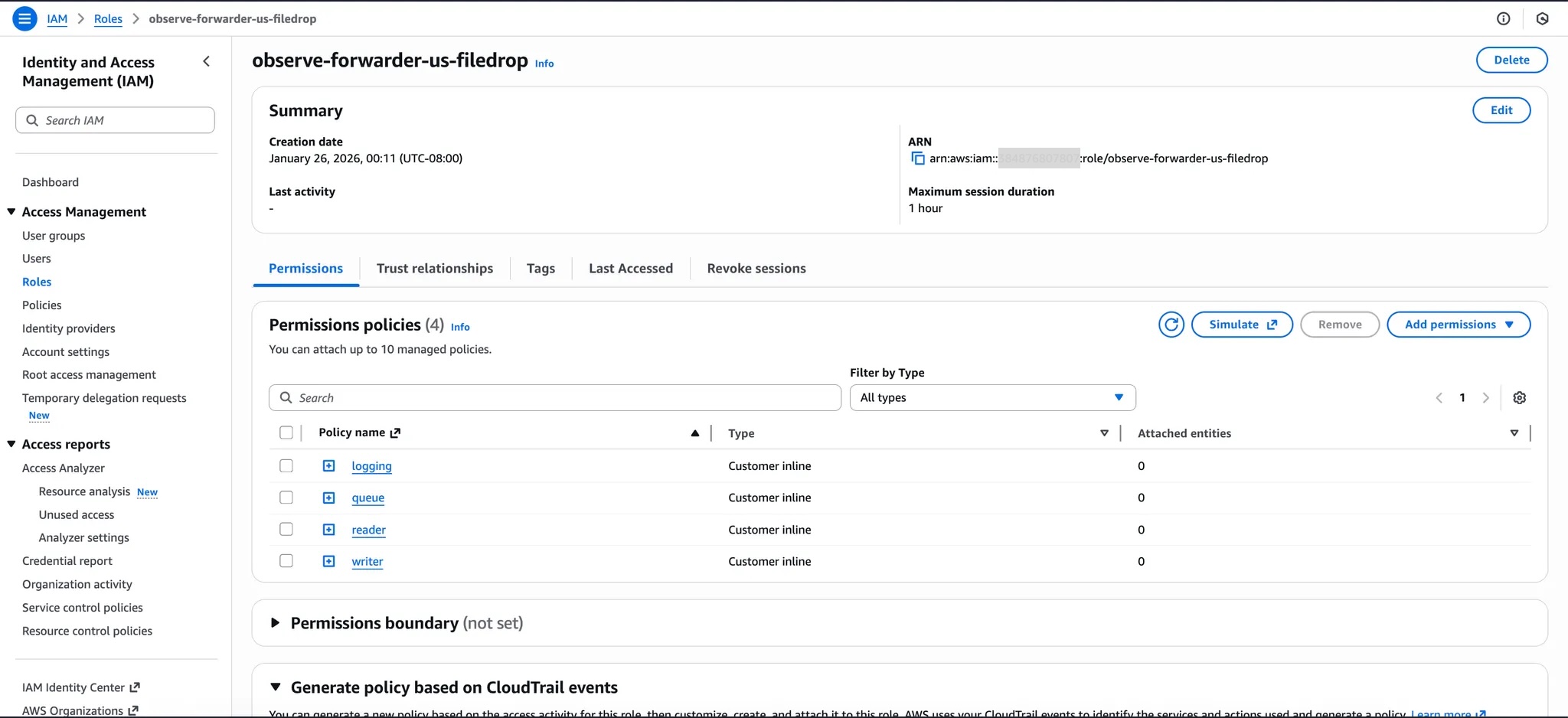
Once the CloudFormation stack is created, make sure the IAM Role name (observe-forwarder-us-filedrop) we specified while creating a Filedrop is created successfully.
Updated about 1 month ago