

Install the MongoDB Atlas app
What type of data does the MongoDB Atlas app ingest?
The MongoDB Atlas app collects data from the Observe by Snowflake poller for MongoDB Atlas. The below data is periodically collected:
- Metadata about your organization, projects, clusters, and processes.
- All available metrics from MongoDB Atlas API.
The following sections describe how to ingest data, install, and configure the collectors. For more about exploring this data, see View MongoDB Atlas data in Observe by Snowflake.
Install the app
Use the instructions in Observe by Snowflake apps to find and install the MongoDB Atlas app.
Configure the MongoDB Atlas Poller
Pollers periodically request data from the MongoDB Atlas Administration API, allowing ingestion of existing details without relying on a triggering event. The poller ingests data to supply these sources:
- Project Dataset
- Cluster Dataset
- Process Dataset
- Organization Dataset
- Database User Dataset
- Org User Dataset
- Home Dashboard
- Monitoring Dashboard
- Performance Dashboard
To allow the poller to access the Atlas Administration API, create an Organization API Key
NoteTo perform any of the following actions, you must have
Organization Owneraccess to Atlas. See Atlas User Roles in the MongoDB Atlas documentation for more information.
- Log into MongoDB as the user you want to generate the API keys.
- Go to the Organization Access Manager page for your organization and click Create API Key.
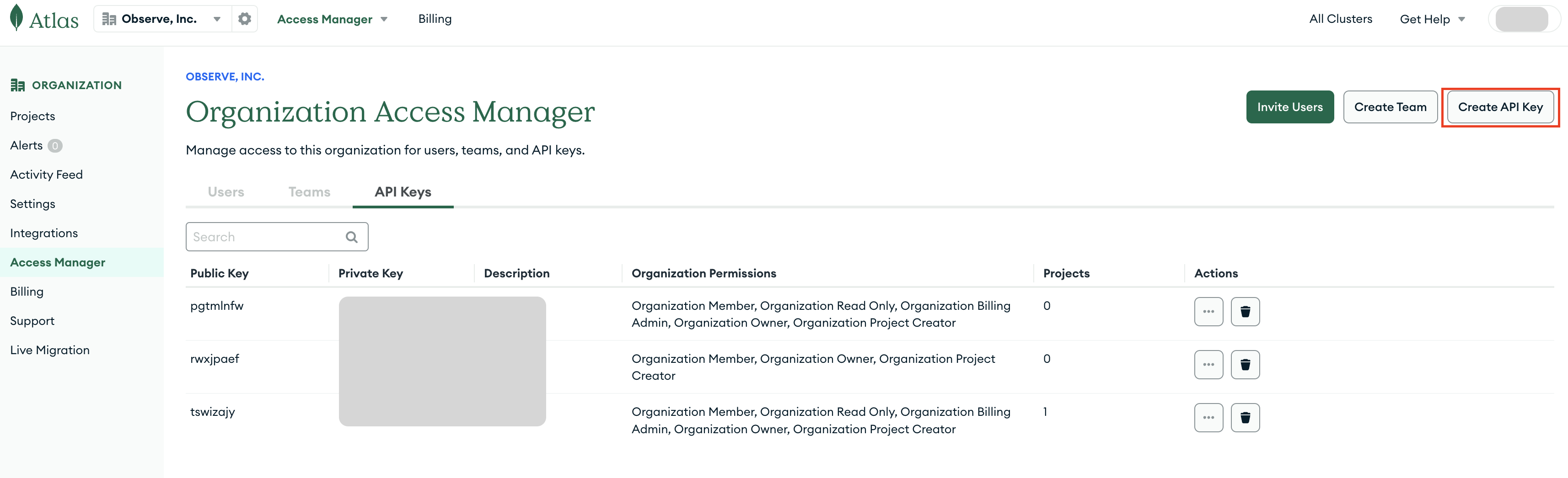
- Enter the API Key Information.
- Enter a Description
- In the Organization Permissions, check Organization Read Only:
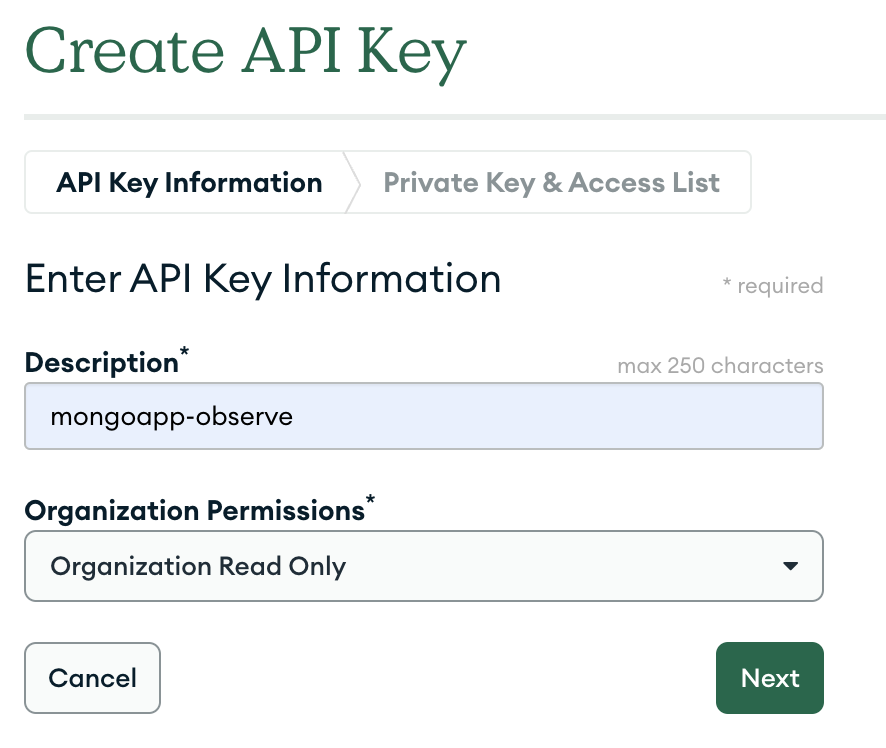
- Click Next and record both the Public Key and the Private Key
- Click Done and ensure the keys are present in the Organization Access Manager home page.
In Observe by Snowflake, configure the MongoDB Atlas Poller to collect and ingest data:
-
In the MongoDB Atlas app, go to the Connections tab.
-
Under Data connection requirements, in the Poll updates from the MongoDB Atlas API section, click Get Started.
-
In the Create poller dialog, configure the following settings:
- For Public Key, enter the public key obtained from Organization Access Manager.
- For Private Key, enter the private key obtained from Organization Access Manager.
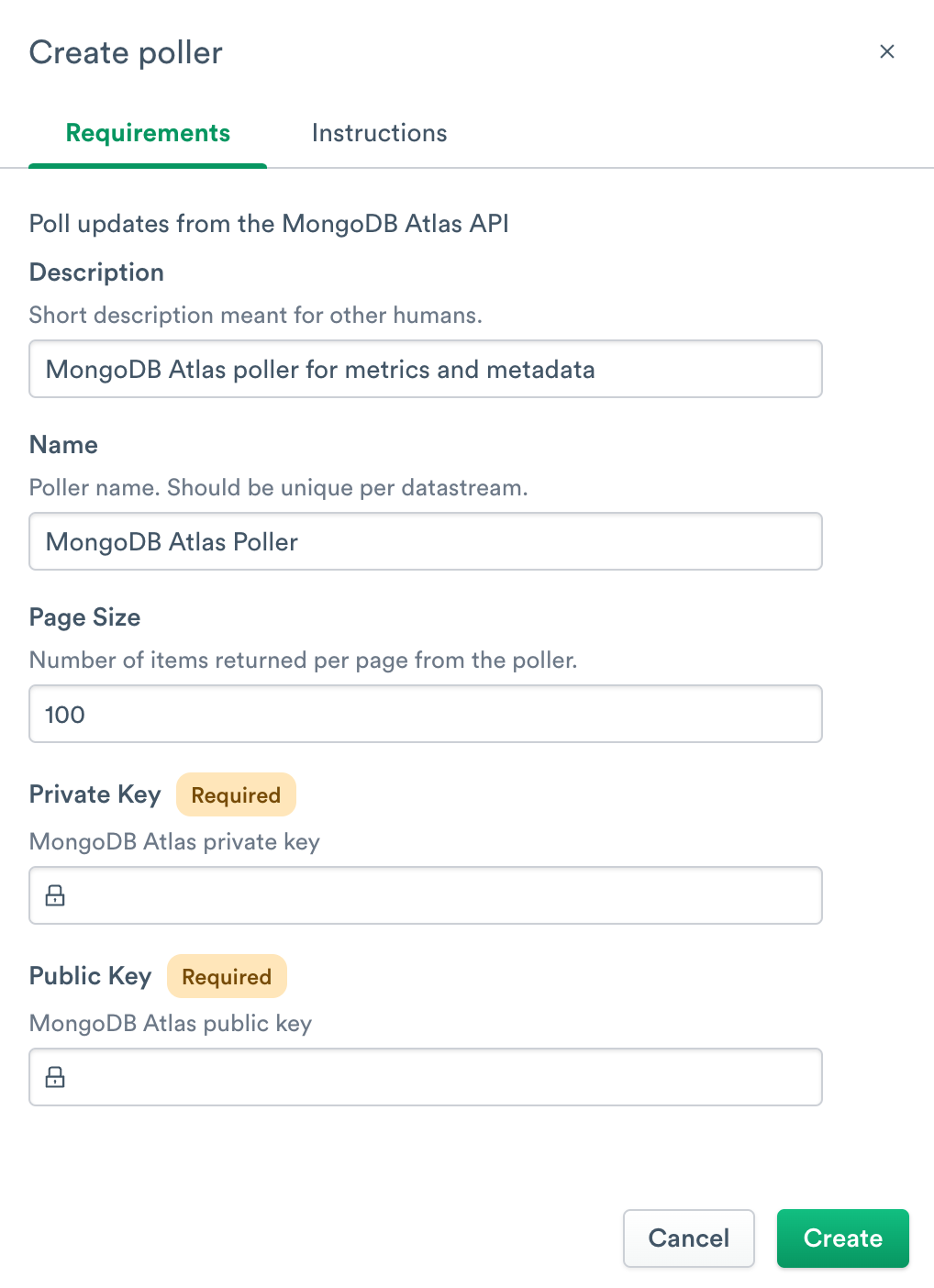
You have now configured the MongoDB Atlas app and can send your MongoDB Atlas data to Observe by Snowflake.
NoteCertain MongoDB Atlas resources limit how many requests they can process per minute. MongoDB Atlas limits these requests to 100 requests per minute per project. If this rate limit is exceeded, the poller may return a 429 HTTP status code.
Contact MongoDB to increase this rate limit, if needed. See Atlas docs for more information.
Updated about 1 month ago