

Set default permissions using RBAC
Learn how to use RBAC to control access to Observe by Snowflake actions and objects.
Role-Based Access Control (RBAC) allows you to control access to Observe by Snowflake actions and objects, based on the permissions assigned to groups in your organization. When you add users to a group, the user inherits the group's permissions. You can assign users to multiple groups to fune-tune the permissions you need for any user.
Observe by Snowflake RBAC provides the ability to do the following:
- Grant access to specific objects, such as dashboards, Datasets, Datastreams, or Worksheets.
- Grant the ability to perform actions, such as inviting users, creating Worksheets, or creating Monitors.
Granting access to specific objects is done at the user and group level, and granting actions happens only at the group level.
Workspace permissions
Every Observe by Snowflake customer has a workspace containing all of their users, data, and objects, such as Datastreams, Datasets, Monitors, Worksheets, and dashboards. By default, a new Observe by Snowflake tenant grants edit access to everything for the everyone group. From the Permission manager, you can set a workspace-level policy that sets the default permissions of all newly created objects in your workspace, except for Datasets and Monitors.
The default workspace permissions settings are as follows:
- Creator can Edit All types - The user creating the object will have edit access by default. This is the only immutable default sharing policy.
- Everyone can Edit All types - All active users in the workspace can view all objects by default.
You can customize workspace permissions to suit your organizations access control needs. The only immutable setting is Creator can Edit All types. Workspace permissions support either view or edit for all object types, or you can select one or all of the following targeted object types: dashboards, Datastreams, and Worksheets.
In the following example, the creator of the object can edit anything they have created, all users in the viewer group can view all newly created dashboards by default, but nothing else. All users in the writer group can edit all newly created dashboards and Worksheets, but nothing else.
To secure access to existing content, use the Permission manager.
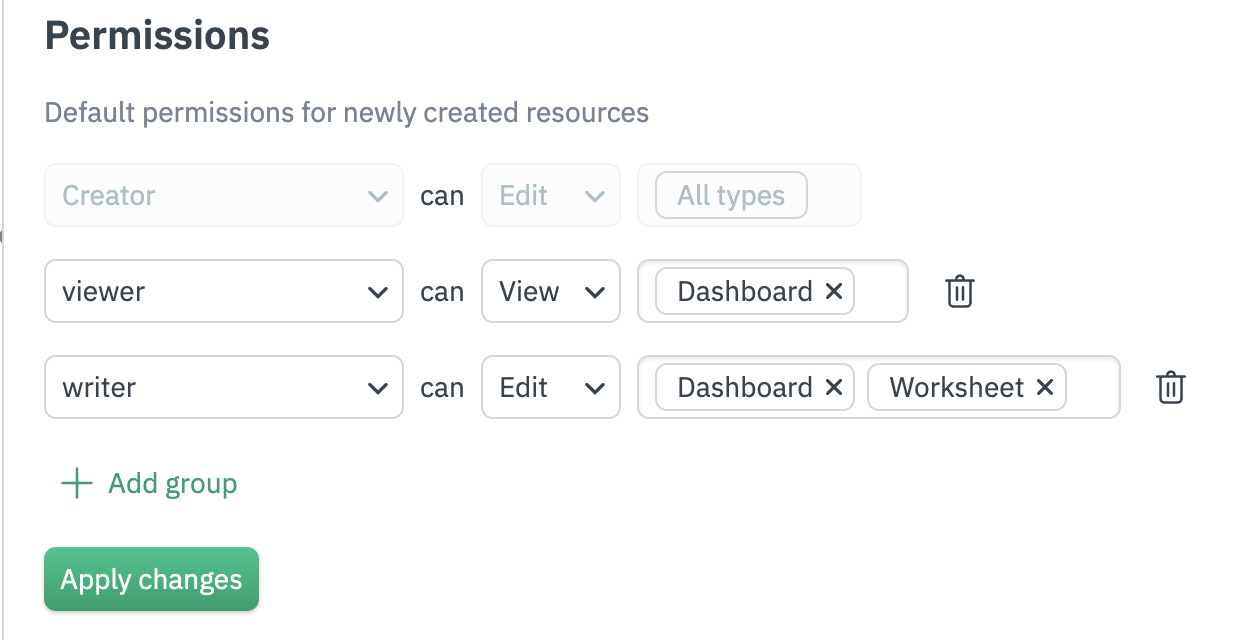
You can set up to 10 individual default workspace permissions. These permissions are not retroactive, and apply to objects created after you save your settings. All object-specific permissions can be changed at any time by users with Edit access to that particular object.
Default workspace permissions can be managed via the Observe by Snowflake Terraform provider, via the observe_workspace_default_grants resource.
RBAC and object visibility
Private preview feature (Invite only)This feature is enabled per tenant by Observe by Snowflake and is not generally available. To participate, contact your Observe by Snowflake representative. You may access and use this preview feature solely for internal evaluation purposes. Previews are provided as-is. Your use of this preview is subject to the Snowflake Preview Terms located at https://www.snowflake.com/en/legal.
Objects in Observe by Snowflake are also bound by visibility settings using RBAC. From the previous example, let's suppose a user in the writer group creates a dashboard. Based on the settings, any user in the writer or viewer group can view that dashboard. The dashboard will also appear in search results.
However, any users not in these two groups who don't have view permissions for dashboards won't be able to view the dashboard at all. The dashboard won't appear in the Dashboard Explorer list, and won't appear in any search results.
If an object refers to an inaccessible object, such as a Dataset that inherits tags from another inaccessible upstream Dataset, the inaccessible object name is marked as restricted:
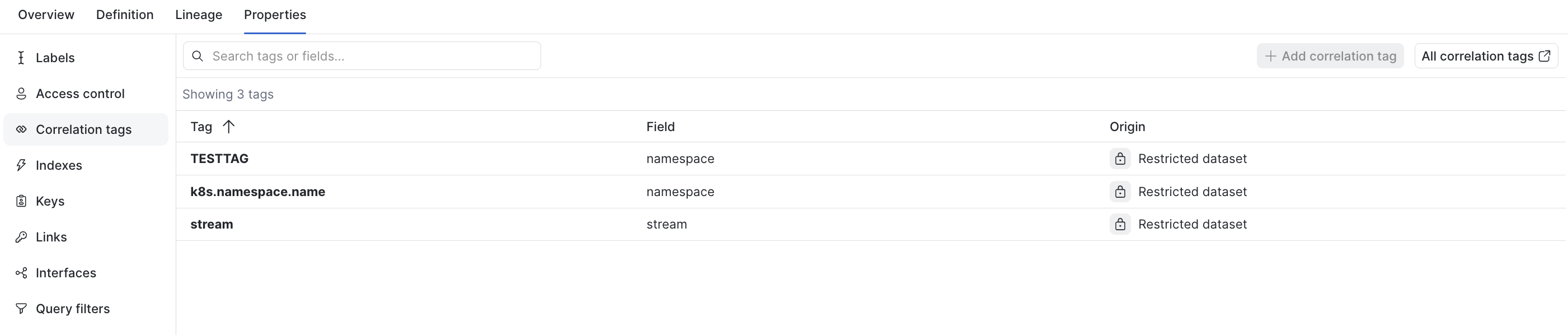
This behavior is consistent for all objects in Observe by Snowflake, including Datasets, dashboards, Worksheets, and Monitors.
RBAC best practices
When you grant permissions using RBAC, grant only the permissions required to perform a task. You do this by defining the actions taken on specific resources (objects) under specific conditions, also known as least-privilege permissions. You might start broad, while you explore the specific permissions required for your workload or use case. As your use case matures, you can work to reduce the permissions that you grant to work toward least privilege.
Permissions to perform specific actions are granted at the group level, see the section Group Permissions for more details. This includes operations like creating Datasets, Datastreams, Worksheets, and inviting users.
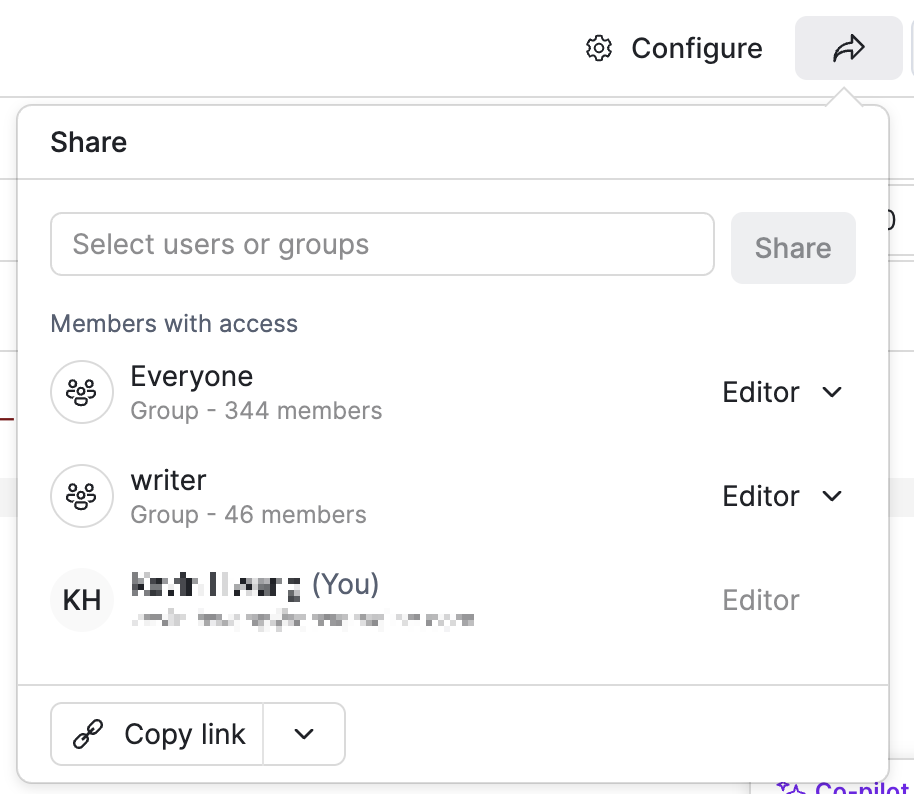
Permissions to view or edit a specific instance of an object, such as a particular monitor, dashboard, dataset, etc. can be granted at the user or group level. There are two object-level level permissions; view and edit, you can also remove groups or users from being able to access the object at all. You can access these controls via the “share” arrow in the top right of the specific object’s page.
RBAC and SAML SSO
Observe by Snowflake supports integration with an external Identity Provider (IdP) via the SAML protocol. For integration-specific instructions, see Configure single sign-on.
To automatically add users to an Observe by Snowflake group, based on their SAML group membership, you must create an group in Observe by Snowflake that matches the group name in the SAML assertion.
Updated 21 days ago