

Observe by Snowflake on Iceberg
Learn how to use Observe by Snowflake with your own data in Apache Iceberg tables.
Private preview feature (Invite only)This feature is enabled per tenant by Observe by Snowflake and is not generally available. To participate, contact your Observe by Snowflake representative. You may access and use this preview feature solely for internal evaluation purposes. Previews are provided as-is. Your use of this preview is subject to the Snowflake Preview Terms located at https://www.snowflake.com/en/legal.
Observe by Snowflake on Iceberg allows you to use Observe by Snowflake and store your observability data as open Apache Iceberg™ tables in your own Amazon S3 bucket, offering you the following benefits:
- You own your data. Your Datasets are written as standard Iceberg tables in your S3 bucket. All existing Observe by Snowflake functionality works as normal, while reading from and writing data to your S3 bucket.
- Open, engine-independent access. Query your open Iceberg data directly with external query engines, such as Apache Spark™, DuckDB, Trino, or PyIceberg, without using the Observe by Snowflake query engine. Observe by Snowflake exposes a read-only Iceberg REST Catalog so those engines can discover and read your tables.
Can I bring data from my own S3 buckets?
For this preview, only Snowflake-managed Iceberg tables (Observe by Snowflake writing to the S3 bucket) are supported. Reading from third-party or self-managed Iceberg tables will be supported in a later release.
Is S3 on Outpost supported? What about Control Tower SCPs?
S3 on Outpost is not supported.
Standard ControlTower service control policies (SCPs) are likely fine unless org-added SCPs restrict S3 writes, encryption, region, or AssumeRole. Observe by Snowflake does not create any S3 bucket policy — it requires a bucket + an IAM role with access.
Who is this for? Teams that want to retain ownership and portability of their telemetry data, run their own analytics/ML on it with the engine of their choice, and avoid lock-in, while keeping the full Observe by Snowflake experience on top of the same data.
How it works
Your data flows into Iceberg tables in your bucket, and is reachable through Observe by Snowflake or directly through external query engines via the catalog:
flowchart LR
  subgraph Observe
    ING[Ingest pipelines] --> SRC[Source datasets]
    XF[OPAL transformations] --> DER[Derived datasets]
    QE[Observe query engine] --- SRC
    QE --- DER
    CAT[Observe REST API<br>Iceberg catalog endpoints<br>read-only]
  end

  subgraph "Your AWS account"
    S3[(Your S3 bucket<br>Iceberg tables)]
  end

  SRC -- write --> S3
  DER -- write --> S3
  QE -- read --> S3

  EXT[External engines<br>Spark, DuckDB, Trino] -- 1. metadata REST --> CAT
  CAT -- table location and schema --> EXT
  EXT -- 2. read data files directly --> S3
The following table defines some of the key concepts:
| Term | Definition |
|---|---|
| Data Lake | A configured connection from Observe by Snowflake to an S3 bucket where your Iceberg tables are written. You can create multiple data lakes. Datasets stored on different data lakes are fully isolated and never interfere with one another. |
| External ID | A unique value Observe by Snowflake generates during data lake setup. You embed the external ID in the AWS IAM role's trust policy so that only Observe by Snowflake, acting for your tenant, can assume the role. |
| IAM role | A role you create in your AWS account that grants Observe by Snowflake scoped access to your S3 bucket. You supply its ARN when creating the data lake. |
| Source Dataset | A Dataset populated by Observe by Snowflake ingest pipelines. |
| Derived Dataset | A Dataset defined in OPAL and produced by Observe by Snowflake from an OPAL query, such as when you save a Worksheet as a Dataset. |
| Iceberg REST Catalog | A read-only set of endpoints on the Observe by Snowflake REST API implementing a subset of the Apache Iceberg REST Catalog protocol, so external engines can list, load, and describe your Iceberg tables. It runs on your normal Observe by Snowflake API host — there is no separate service to connect to. |
Data ownership and security
This section describes the data ownership and security measures in place for setting up Observe by Snowflake on Iceberg.
- Your data, your bucket. When a Dataset is stored on a data lake, its Iceberg tables are written to the S3 location you own, and external engines read them from there with your own credentials. Any Datasets that are not placed on a data lake use Observe by Snowflake-managed storage. If you remove the data lake, or revoke the IAM role, Observe by Snowflake loses access to that location.
- HTTPS Authentication. Observe by Snowflake uses public HTTPS to connect to your S3 buckets.
- Scoped access. Observe by Snowflake accesses your S3 bucket only via the IAM role you create, restricted by your external ID and the permissions you grant.
- Read-only external access. The catalog only serves metadata for read operations; external engines can't modify your tables using the catalog.
- Direct data path. External engines read data files straight from your S3 bucket with your own credentials. Data does not go through Observe by Snowflake for external reads.
What is the data retention policy?
Data is retained based on Observe by Snowflake's data retention policies, not the S3 lifecycle rules.
Which S3 storage class can I use?
It is recommended to use a Standard S3 storage class.
Requirements
Verify the following requirements are met:
- Your Observe by Snowflake tenant is enabled for the Observe by Snowflake on Iceberg private preview by Observe.
- You have an AWS account and S3 bucket you control. The private preview supports Amazon S3 only, with one AWS region per Data Lake.
- You have permission to create an IAM role and edit its trust policy in that AWS account.
- For external engine access, you must have an engine that supports the Iceberg REST catalog, such as Apache Spark 3.x with the Iceberg runtime, DuckDB with the Iceberg extension, Trino, or PyIceberg.
- You have write privileges for Iceberg catalog assigned to your group in Observe by Snowflake. See Manage groups and members.
First, create a data lake
A data lake is established with a one-time AWS handshake: you create an IAM role that trusts Observe by Snowflake (scoped by an external ID), then point the data lake at your bucket.
NoteIf you already have a data lake you want to use, you can skip this section and go to Store your Datasets on the new data lake.
Perform the following steps in Observe by Snowflake to create a new data lake:
- From the left navigation, select Data & integrations > Data lakes.
- Click Add data lake.
- Give your data lake a name and select Amazon S3 as the provider.
- Click Next. You will see the trust and permission policies provided here to create an IAM role.
NoteMake a note of the external ID provided. Creating an IAM role in this manner can take some time. If you need to leave and return to the Observe by Snowflake UI later, you will need to provide the external ID in order to return to the same session.
- Click the Open AWS IAM console link.
- Choose the Custom trust policy card.
- Paste the trust policy from Observe by Snowflake into AWS as the new custom trust policy.
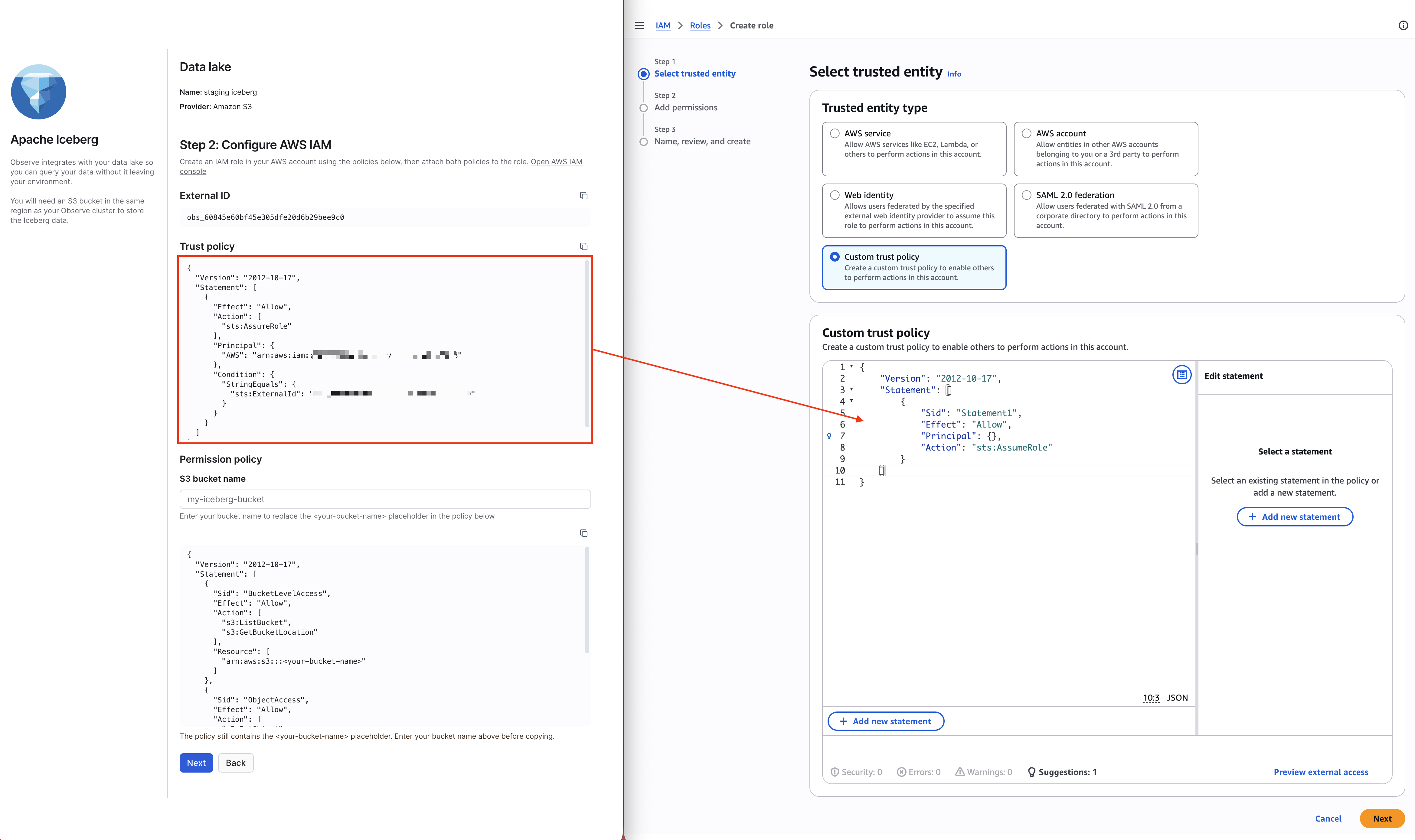
- In AWS, click Next.
- Click Create inline policy.
- Copy the permission policy from Observe by Snowflake and paste it into the Policy Editor. The
<your-bucket-name>placeholder appears twice in the policy, be sure to replace both placeholders with the actual name of your S3 bucket.
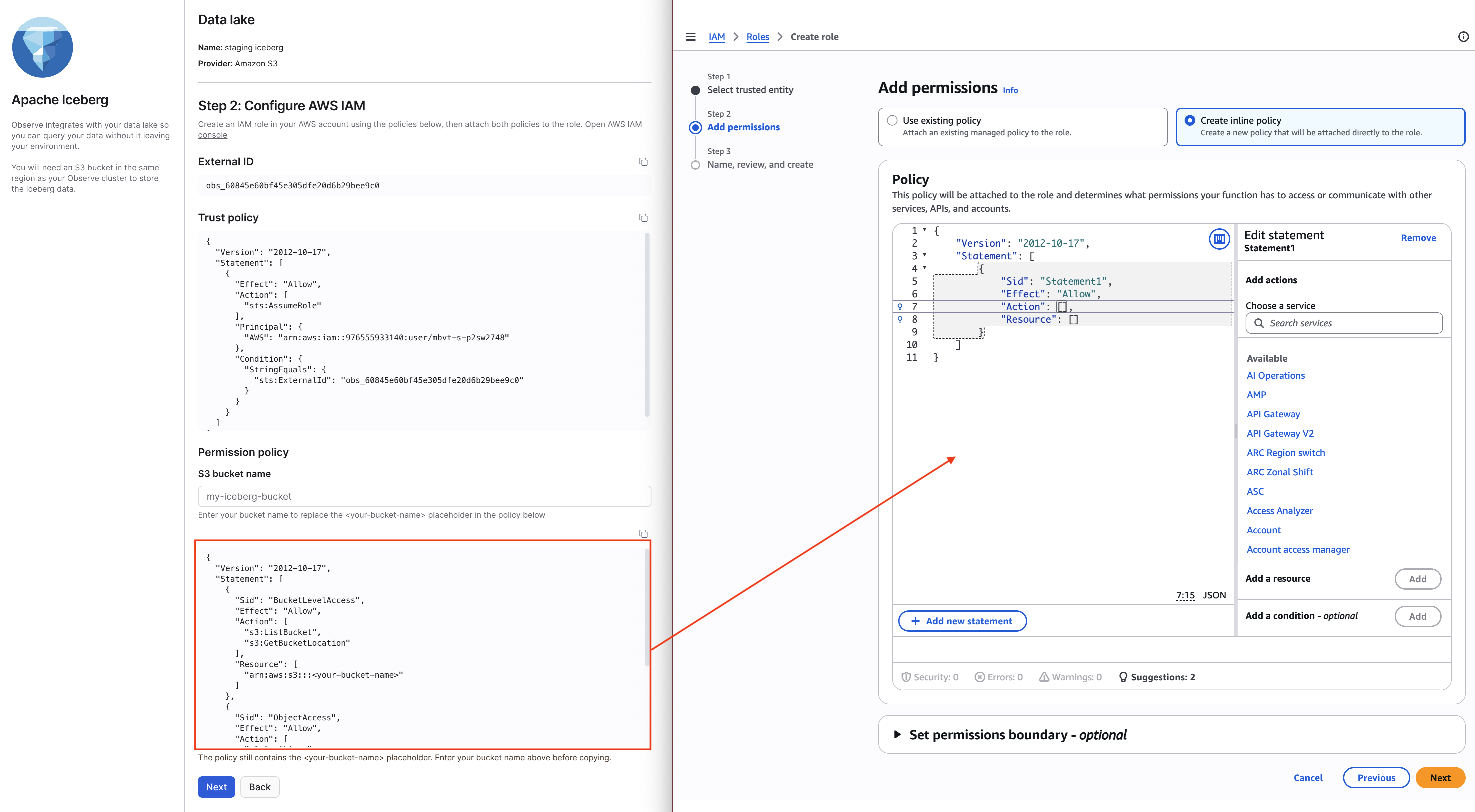
- In AWS, click Next.
- Give your permission policy a name, then click Create policy.
Perform the rest of the steps in Observe by Snowflake.
-
After you create your IAM role, click Next.
-
In Step 3: connect your storage, provide the following information to grant Observe by Snowflake scoped access to your S3 bucket using the IAM role you just created.
-
The URL to the S3 bucket where Iceberg data is stored. Use a clean directory without any pre-existing contents. Do not use a sub-directory of an existing data lake.
-
The ARN of the IAM role you just created. To find this, click on IAM in your AWS Console, then click Roles, then click on your role name.
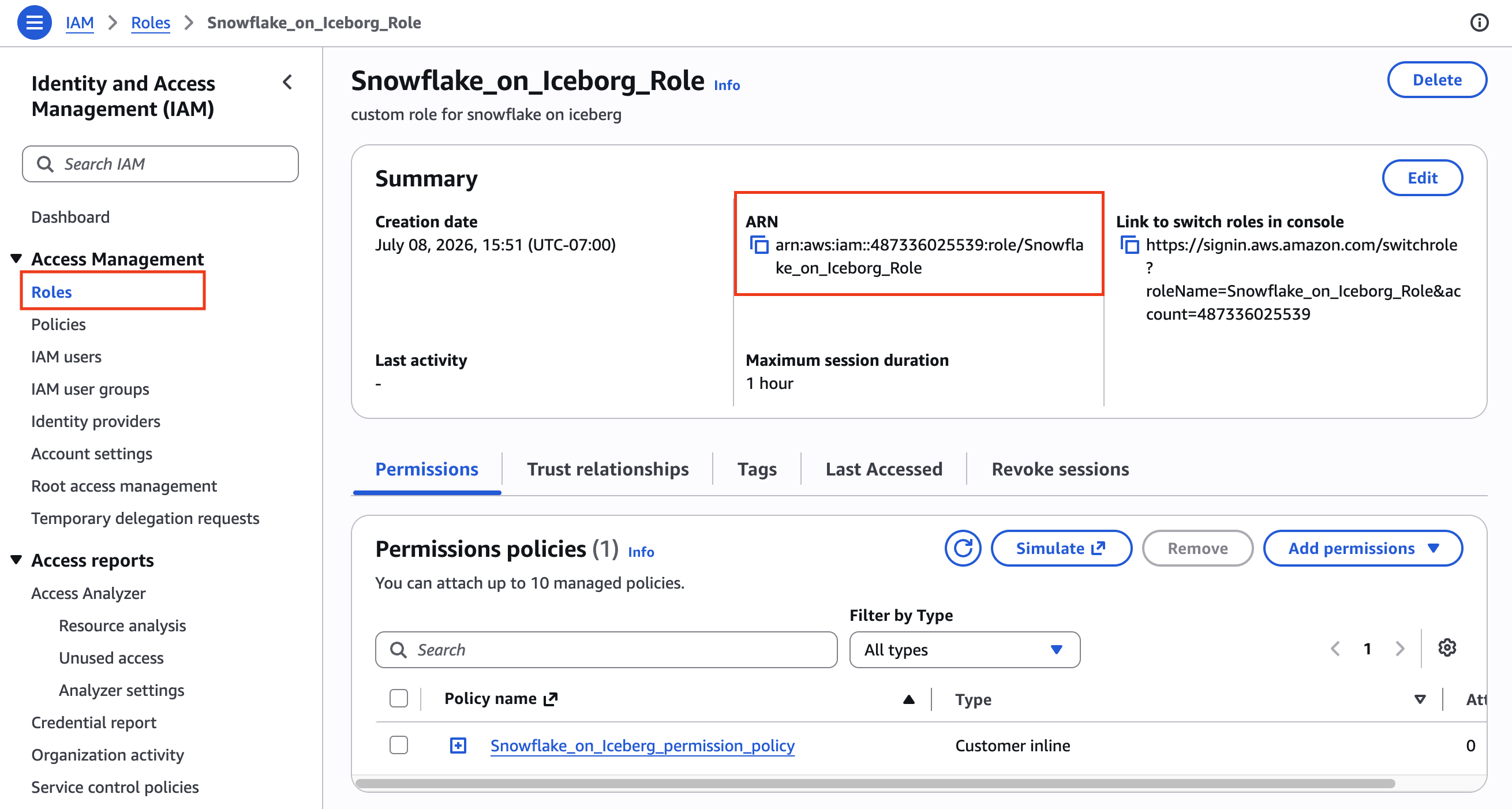
-
-
Click Create data lake.
Store your Datasets on the new data lake
When you create a Dataset in Observe by Snowflake, you can store the Dataset in the data lake you just created. Both Source Datasets and Derived Datasets can be saved to your data lake:
| Dataset type | Populated by | How you choose the data lake |
|---|---|---|
| Source Dataset | Ingest pipelines | From the Data & integrations menu. |
| Derived Dataset | OPAL transformations | When you save a Dataset from a Worksheet. |
Perform the following steps to add a Source Dataset to a data lake directly from the Data & integrations menu:
- From the left navigation rail, select Data & integrations > Add data, then select the Source Dataset card.
- Select a data type and data lake. If you don't have any data lakes configured yet, you can create one here, then continue with creating a Source Dataset.
- Specify a package name, Source Dataset name, and provide a description. In the Data Retention field, select how long you want your data to remain in our Snowflake tables.
- Click Continue.
When you are working with any Dataset on top of a data lake, your daily activities and workflows don't change at all. The only difference is that the data now lives in your S3 bucket as Iceberg tables.
Datasets on separate data lakes are independent. A graph of Datasets built on top of one another doesn't require them to share a data lake, and data lakes don't interfere with each other.
Query your Iceberg tables with external engines
You can point any Iceberg-compatible query engine at the Observe by Snowflake catalog and read your Iceberg tables directly.
NoteExternal query engines can read your scalar/typed columns directly. Semi-structured fields, such as log/trace bodies and meta data, are stored in a VARIANT column type that many external engines can't yet decode.
What your external query engine needs
Verify the following requirements for you external query engine:
- Access to the Observe by Snowflake Iceberg REST Catalog (read-only), for metadata.
- Access to the S3 bucket where the Iceberg table is stored. Your external engine reads the data files directly with its own AWS credentials. For Datasets stored on a data lake, that bucket is your own S3 bucket, so your existing AWS credentials apply.
NoteThe Observe by Snowflake catalog returns table metadata only. It doesn't vend storage credentials. Your external query engine must supply its own AWS credentials for the location where the table's data files are located.
Observe by Snowflake catalog endpoint and authentication
The Observe by Snowflake catalog is located at the following endpoint:
https://<your-tenant>.observeinc.com/v1/iceberg/catalogTo authenticate, use your existing Observe by Snowflake API token. You don't need a separate credential to use the catalog, and the token lifetime/rotation follow your normal Observe by Snowflake API token settings
Connect Apache Spark
Connect an Apache Spark environment to Observe using an Apache Iceberg REST catalog:
# Register the Observe catalog as a Spark Iceberg REST catalog
spark.sql.catalog.observe                 = org.apache.iceberg.spark.SparkCatalog
spark.sql.catalog.observe.type            = rest
spark.sql.catalog.observe.uri             = https://<your-tenant>.observeinc.com/v1/iceberg/catalog
spark.sql.catalog.observe.token           = <your-customer-id> <token-secret>
# Data files live in YOUR bucket; Spark reads them with YOUR AWS credentials
spark.sql.catalog.observe.io-impl         = org.apache.iceberg.aws.s3.S3FileIO
spark.sql.extensions                      = org.apache.iceberg.spark.extensions.IcebergSparkSessionExtensions
Run the following commands from Apache Spark to verify the connection and preview some of your data:
SHOW NAMESPACES IN observe;            -- → iceberg
SHOW TABLES IN observe.iceberg;
SELECT * FROM observe.iceberg.<table> LIMIT 100;
Connect DuckDB
Run the following commands from DuckDB to connect DuckDB to Observe by Snowflake and preview some of your data:
INSTALL iceberg; LOAD iceberg;
-- Attach the Observe REST catalog
ATTACH 'observe' AS observe (
  TYPE ICEBERG,
  ENDPOINT 'https://<your-tenant>.observeinc.com/v1/iceberg/catalog',
  TOKEN '<your-customer-id> <token-secret>'
);
SELECT * FROM observe.iceberg.<table> LIMIT 100;
NoteDuckDB's Iceberg extension automatically sends an
X-Iceberg-Access-Delegation: vended-credentialsheader on list/load requests. The Observe by Snowflake catalog implements noX-Iceberg-*headers and rejects them with 400 error, so a default DuckDBATTACHfails until that header is suppressed.
Catalog API reference
The Observe by Snowflake REST API serves a read-only subset of the Apache Iceberg REST Catalog protocol under the v1/iceberg/catalog endpoint. These are ordinary Observe by Snowflake API endpoints, authenticated with your existing Observe by Snowflake API token.
Typically these API endpoints are called by you Iceberg client, such as your external query engine, but they are documented in the Get started with the Apache Polaris and Apache Iceberg REST catalog API for reference and troubleshooting.
Updated 3 days ago