

Connect your AI agents with the Observe by Snowflake documentation
Learn how your AI agents can consume Observe by Snowflake's documentation.
MCP server
Connect your AI agents to the following URL to access the MCP server for the Observe by Snowflake documentation:
https://docs.observeinc.com/mcpSee MCP in the Readme documentation for more information.
LLM text file
Use the LLMs.txt file to make the Observe by Snowflake documentation readable by your AI language models.
https://docs.observeinc.com/llms.txtSee LLMs.txt in the Readme documentation for more information.
View the raw Markdown for any page
Add .md to the end of any URL in the Observe by Snowflake documentation to get the raw Markdown for that page, which can be easily consumed by your AI agents. For example, the URL for this page is:
https://docs.observeinc.com/update/docs/connect-your-ai-agents-with-the-observe-documentationUse the following URL to view the raw Markdown:
https://docs.observeinc.com/update/docs/connect-your-ai-agents-with-the-observe-documentation.mdUse the AI dropdown
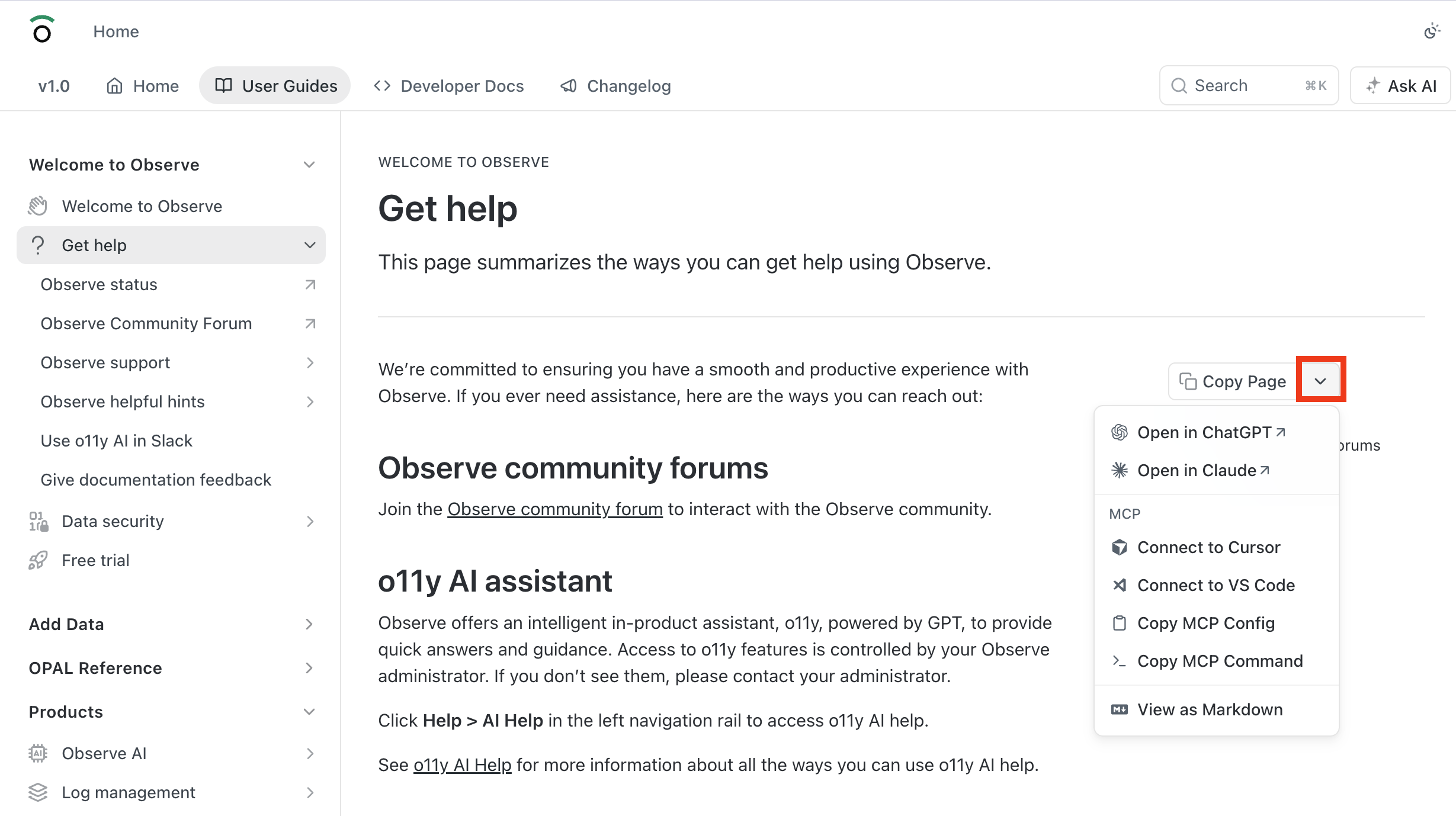
From any page in the Observe by Snowflake documentation, click the down caret icon () next to Copy Page and get access to various AI options, such as sending the page content directly to ChatGPT or Claude, or connecting to your own Cursor or VS Code instances:
Updated about 1 month ago