Worksheets Explorer

Learn how to view and find Worksheets in Observe.

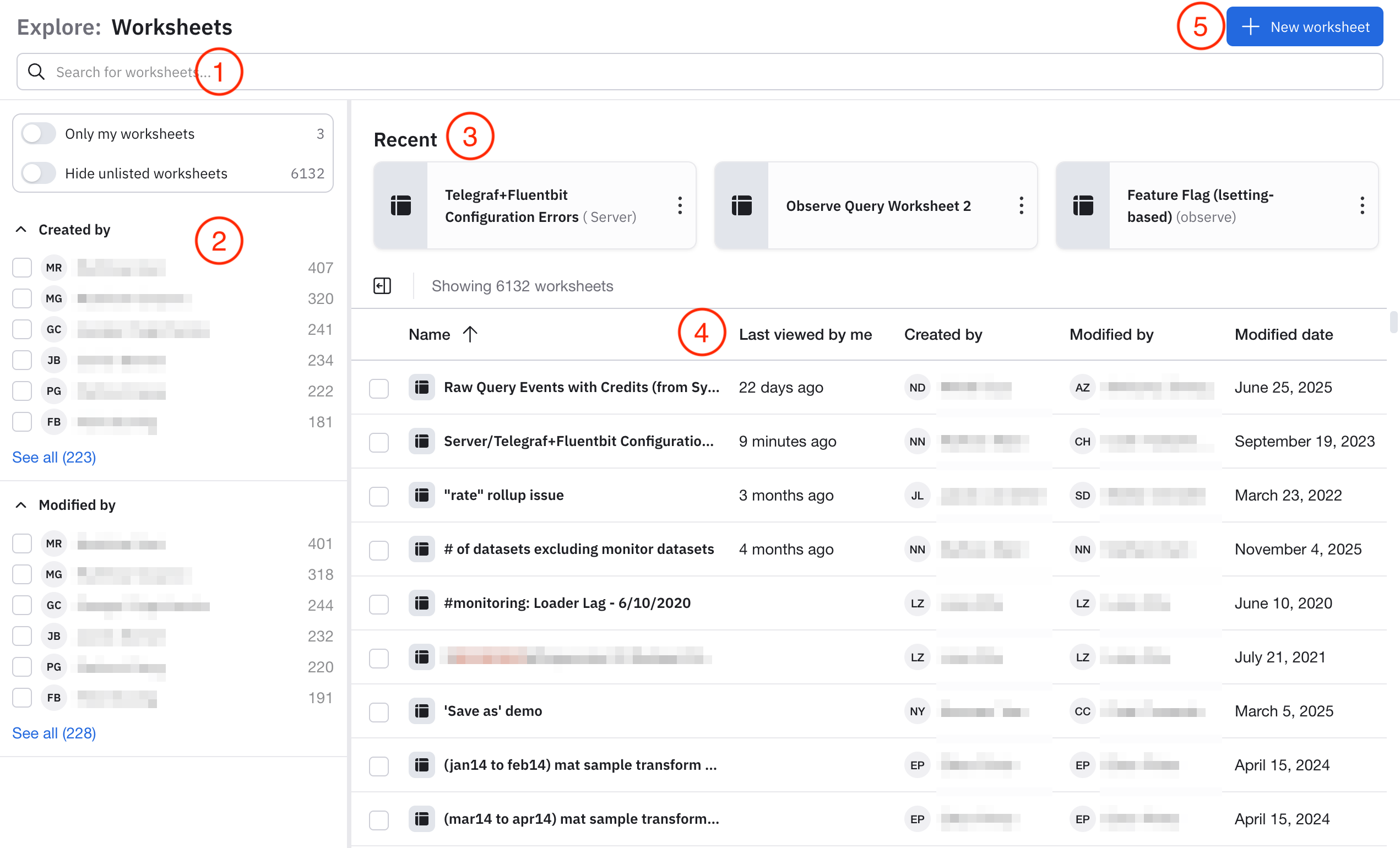
Click Worksheets in the left navigation rail to access the Worksheets Explorer, where you can view a list of all available Worksheets on your Observe instance:

The major components of the Worksheets Explorer are described below.

ComponentDescription
(1)
Filter bar
Use the filter bar to find specific dashboards. To populate the filter bar, you can do any of the following:
  • Select something in the filter panel to have that value appear in the filter bar.
  • Click in the filter bar, then select the fields and values you desire with the help that appears.
  • Type your query directly into the filter bar. You can use ~ or !~ for keyword matching. For example, you can type name ~ container to find any Worksheets whose name contains the string container.
(2)
Filter panel
Select any item in the filter panel to narrow down the dashboards that are listed on the page. Anything you select is also entered into the search bar.
  • Slide the Only my worksheets toggle to the on position to view only Worksheets you created.
  • Slide the Hide unlisted worksheets toggle to the on position to view only Worksheets that are created but still in an unlisted state. By default, all listed and unlisted Worksheets are shown. The Visibility column in the Worksheets list shows you the visibility setting of each Worksheet.
  • Select any additional item in the filter panel to narrow the list Worksheets shown on the page, such as who created the dashboard, and who last modified the dashboard.
(3)
Recents
The Worksheets you most recently viewed are listed in this area. If you haven't viewed any Worksheets recently, there won't be anything here.
(4)
Worksheet list
The list of Worksheets based on your filter and search criteria.
  • Click the checkbox in front of each Worksheet name to delete the selected Worksheet.
  • Hover on any Worksheet row to access additional options, such as editing, copying the link to the Worksheet, or making a duplicate of the Worksheet.
(5)
New Worksheets
Click New worksheet to begin creating a new Worksheet. See Create Worksheets.


Did this page help you?